
A lightweight Python concurrency framework to orchestrate multi-threaded and multi-processed tasks with a unified API.


-
Orchestrated Concurrency Management
-
Easy to Code and Perform
-
Adaptive Execution Modes
-
Real-time TPS Metrics
Just write your own callback functions using the library, then run it and collect the result details:
$ python3 main.py

Worker Dispatcher Configutation:
- Local CPU core: 10
- Tasks Count: 100
- Runtime: Unlimited
- Dispatch Mode: Fixed Workers (Default)
- Concurrency Info:
  ├─ Execution Type: Processing
  ├─ Configured Workers: 10 Worker(s)
  ├─ Pool Structure:
  │  └─ Main Pool : 10 Process(es)
  └─ Total Concurrency: 10 Active Worker(s)

--- Start to dispatch workers at 2024-06-14T17:46:30.996685+08:00 ---

...(User-defined output)...

--- End of worker dispatch at 2024-06-14T17:46:41.420888+08:00---

Spend Time: 10.424203 sec
Completed Tasks Count: 100
Uncompleted Tasks Count: 0
Undispatched Tasks Count: 0
Use 20 theads concurrently to dispatch tasks for HTTP reqeusts
import worker_dispatcher
import requests

def each_task(id: int, config, task, metadata):
    response = requests.get(config['my_endpoint'] + task)
    return response

responses = worker_dispatcher.start({
    'task': {
        'list': ['ORD_AH001', 'ORD_KL502', '...' , 'ORD_GR393'],
        'function': each_task,
        'config': {
            'my_endpoint': 'https://your.name/order-handler/'
        },
    },
    'worker': {
        'number': 20,
    }
})
Utilizes all CPU cores on the machine to compute tasks.
import worker_dispatcher

def each_task(id: int, config, task, metadata):
    result = sum(id * i for i in range(10**9))
    return result

if __name__ == '__main__':
    results = worker_dispatcher.start({
        'task': {
            'list': 10,
            'function': each_task,
        },
        'worker': {
            'use_processing': True
        }
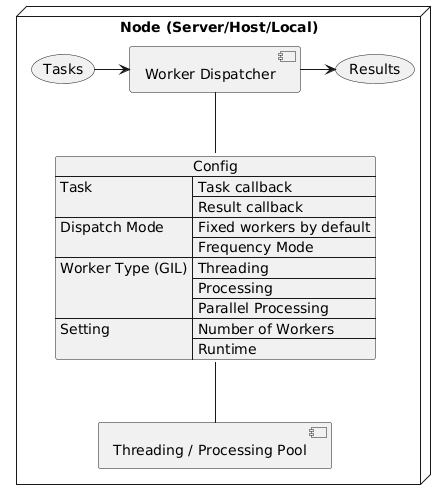
})This library helps to efficiently consume tasks by using multiple threading or processing and returns all results jointly.
To install the current release:
$ pip install worker-dispatcherBy calling the start() method with the configuration parameters, the package will begin dispatching tasks while managing threading or processing based on the provided settings. Once the tasks are completed, the package will return all the results.
An example configuration setting with all options is as follows:
import worker_dispatcher

results = worker_dispatcher.start({
    'debug': False,
    'task': {
        'list': [],                         # Support list and integer. Integer represent the number of tasks to be generated.
        'function': task_function_sample,   # The main function to execute per task
        'config': {},
        'callback': {
            'on_done': False,               # Called with each task's result after each task completes; the return value will overwrite and define the task result
            'on_all_done': False,           # Called with each task's result after all tasks complete; the return value will overwrite and define the task result
        }
    },
    'worker': {
        'number': 8,
        'frequency_mode': {             # Changing from assigning tasks to a fixed number of workers once, to assigning tasks and workers frequently.
            'enabled': False,
            'interval': 1,              # The second(s) of interval
            'accumulated_workers': 0,   # Accumulate the number of workers for each interval for next dispatch. Can be set as a negative number.
            'max_workers': None,        # limit the maximum number of workers to prevent system exhaustion.
        },
        'use_processing': False,        # To break GIL, workers will be based on processing pool.
        'parallel_processing': {        # To break GIL and require a number of workers greater than the number of CPU cores.
            'enabled': False,           # `worker.use_processing` setting will be ignored when enabled. The actual number of workers will be adjusted to a multiple of the CPU core count.
            'use_queue': False,         # Enable a task queue to specify the number of workers without adjustment, though the maximum may be limited by your device.
        },
    },
    'runtime': None,                    # Dispatcher max runtime in seconds
    'verbose': True
})| Option | Type | Deafult | Description |
|---|---|---|---|
| debug | bool | False | Debug mode |
| task.list | multitype | list | The tasks for dispatching to each worker. * - List: Each value will be passed as a parameter to your callback function. - Integer: The number of tasks to be generated. |
| task.function | callable | (sample) | The main function to execute per task |
| task.config | multitype | list | The custom variable to be passed to the callback function |
| task.callback.on_done | callable | Null | The callback function is called with each task's result after each task completes; the return value will overwrite and define the task result |
| task.callback.on_all_done | callable | Null | The callback function is called with each task's result after all tasks complete; the return value will overwrite and define the task result |
| worker.number | int | (auto) | The number of workers to fork. (The default value is the number of local CPU cores) |
| worker.frequency_mode.enabled | bool | False | Changing from assigning tasks to a fixed number of workers once, to assigning tasks and workers frequently. |
| worker.frequency_mode.interval | float | 1 | The second(s) of interval. |
| worker.frequency_mode.accumulated_workers | int | 0 | Accumulate the number of workers for each interval for next dispatch. |
| worker.frequency_mode.max_workers | int | None | limit the maximum number of workers to prevent system exhaustion. |
| worker.use_processing | boolean | False | To break GIL, workers will be based on processing pool. |
| worker.parallel_processing.enabled | bool | False | worker.use_processing setting will be ignored when enabled. The actual number of workers will be adjusted to a multiple of the CPU core count. |
| worker.parallel_processing.use_queue | bool | False | Enable the use of a task queue instead of task dispatch, which allows specifying the number of workers but may be limited by your device. |
| runtime | float | None | Dispatcher max runtime in seconds. |
| verbose | bool | True | Enables or disables verbose mode for detailed output. |
The main function to execute per task
task_function (id: int, config, task, metadata: dict) -> Any| Argument | Type | Deafult | Description |
|---|---|---|---|
| id | int | (auto) | The sequence number generated by each task starting from 1 |
| config | multitype | {} | The custom variable to be passed to the callback function |
| task | multitype | (custom) | Each value from the task.list |
| metadata | dict | {} | A user-defined dictionary for custom metadata per task, saved in its log. |
The return value can be
Falseto indicate task failure in TPS logs.
Alternatively, it can be arequests.Response, indicating failure if the status code is not 200.
The callback function is called with each task's result after each task completes; the return value will overwrite and define the task result
callback_on_done_function (id: int, config, result, log: dict) -> Any| Argument | Type | Deafult | Description |
|---|---|---|---|
| id | int | (auto) | The sequence number generated by each task starting from 1 |
| config | multitype | {} | The custom variable to be passed to the callback function |
| result | multitype | (custom) | Each value returned back from task.callback |
| log | dict | (auto) | Reference: get_logs() |
The callback function is called with each task's result after all tasks complete; the return value will overwrite and define the task result
callback_on_all_done_function (id: int, config, result, log: dict) -> Any| Argument | Type | Deafult | Description |
|---|---|---|---|
| id | int | (auto) | The sequence number generated by each task starting from 1 |
| config | multitype | {} | The custom variable to be passed to the callback function |
| result | multitype | (custom) | Each value returned back from task.callback |
| log | dict | (auto) | Reference: get_logs() |
-
Retrieves a list of all task return values after
start()has completed.Returns an array/list containing only the custom return values from each executed task function.
-
Returns a list of all task logs after
start()has completed.Each log is a dictionary representing a single task's result:
- task_id (Auto-increased number)
- started_at (Unixtime)
- ended_at (Unixtime)
- duration (Seconds)
- result (Boolean or user-defined)
- metadata (can be set within each task function)
-
Retrieves a dictionary containing the execution metrics of the dispatcher itself after
start()has completed.(Note: These timestamps represent the dispatcher's lifecycles, not the min/max timestamps aggregated from all individual tasks.)
{'started_at': 1782288809.0990121, 'ended_at': 1782288813.567204, 'duration': 4.468191862106323} -
Generates a TPS (Transactions Per Second) report as a dictionary based on task logs, either after start() has completed or by providing a custom log list.
def get_tps(logs: dict=None, display_intervals: bool=False, interval: float=0, reverse_interval: bool=False, use_processing: bool=False, verbose: bool=False, debug: bool=False,) -> dict:
The
logsargument must match the structure returned by get_logs() and defaults to the internal logs if not provided. Each task entry within the log is evaluated for success based on the callback_function() rule.Performance Tip: Enabling
use_processingutilizes multiprocessing to significantly accelerate the peak-TPS calculation, especially when dealing with large volumes of logs or long-duration tasks.Example output with
debugmode anduse_processingenabled:--- Start calculating the TPS data --- - Average TPS: 0.83, Total Duration: 1202.3867809772491s, Success Count: 999 --- Start to compile intervals with an interval of 13 seconds --- - Interval - Start Time: 1734937209.851285, End Time: 1734937222.851285, TPS: 51.23 * Peak detected above the current TPS threshold - Interval TPS: 51.23, Main TPS: 0.83 - Interval - Start Time: 1734937222.851285, End Time: 1734937235.851285, TPS: 18.0 - Interval - Start Time: 1734937235.851285, End Time: 1734937248.851285, TPS: 0.0 ... - Interval - Start Time: 1734938405.851285, End Time: 1734938412.238066, TPS: 0.0 --- Start to find the peak TPS --- - Detecting from Start Time: 1734937210, Count: 67, Current TPS Threshold: 51.23, Worker: 104 * Peak detected above the current TPS threshold - TPS: 53.5, Started at: 1734937210, Ended at: 1734937220 * Peak detected above the current TPS threshold - TPS: 53.857142857142854, Started at: 1734937210, Ended at: 1734937224 * Peak detected above the current TPS threshold - TPS: 55.13333333333333, Started at: 1734937210, Ended at: 1734937225 * Peak detected above the current TPS threshold - TPS: 55.166666666666664, Started at: 1734937210, Ended at: 1734937228 - Detecting from Start Time: 1734937224, Count: 73, Current TPS Threshold: 55.166666666666664, Worker: 105 ... - Detecting from Start Time: 1734937212, Count: 82, Current TPS Threshold: 55.166666666666664, Worker: 102 * Peak detected above the current TPS threshold - TPS: 55.53846153846154, Started at: 1734937212, Ended at: 1734937225 -
A custom print function that sets
flush=Trueby default to ensure immediate output to stdout, useful when redirecting output to a file.
Perform a stress test scenario with 10 requests per second.
import worker_dispatcher

def each_task(id, config, task, metadata):
    response = None
    try:
        response = requests.get(config['my_endpoint'], timeout=(5, 10))
    except requests.exceptions.RequestException as e:
        print("An error occurred:", e)
    return response

responses = worker_dispatcher.start({
    'task': {
        'list': 600,
        'function': each_task,
        'config': {
            'my_endpoint': 'https://your.name/api'
        },
    },
    # Light Load with 10 RPS
    'worker': {
        'number': 10,
        'frequency_mode': {
            'enabled': True,
            'interval': 1,
        },
    },
})

print(worker_dispatcher.get_logs())
print(worker_dispatcher.get_tps())
The stress tool, based on this dispatcher, along with statistical TPS reports, is as follows: yidas / python-stress-tool
You can run the script as a background process by adding & at the end of the command, and redirect the output to a file:
$ python3 main.py > log.txt 2>&1 &
2>&1means redirecting stderr (2) to the same location as stdout (1), so both standard output and error messages go to the same file.
For immediate stdout output (e.g., when logging to a file), use worker_dispatcher.print(), which enables flushing by default. Alternatively, use the built-in print(..., flush=True).
import worker_dispatcher

def each_task(id, config, task, metadata):
    # Print immediately to file (stdout is flushed)
    if id % 10 == 0:
        worker_dispatcher.print(f"TaskId: {id}")
    return True

responses = worker_dispatcher.start({
    'task': {
        'list': 600,
        'function': each_task,
        ...
})Here are the differences between the various modes, such as enabling use_processing or parallel_processing
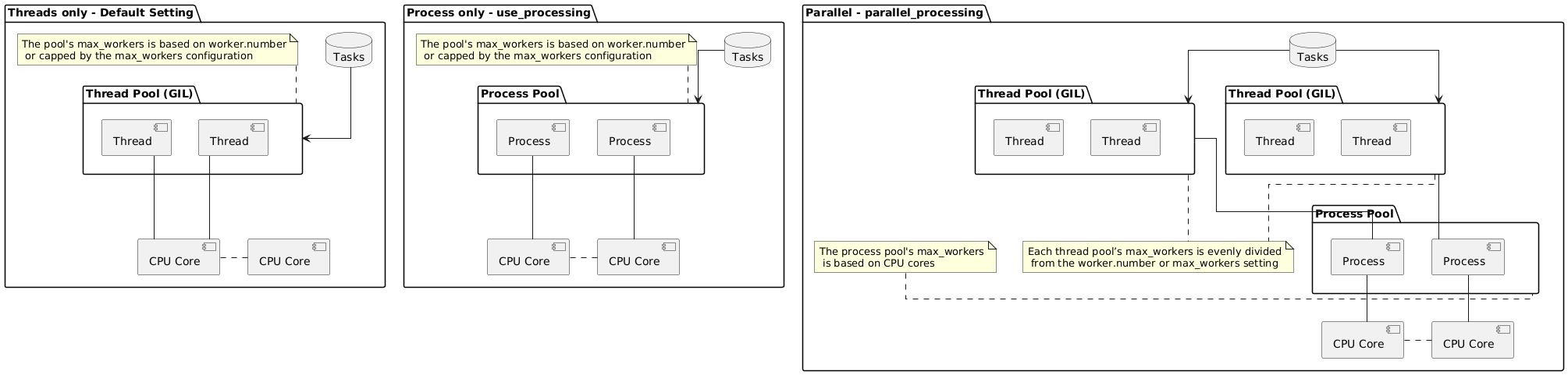
The suitable application scenarios are as follows:
- default:
Suitable for asynchronous I/O tasks. Using too many workers (threads) may lead to significant context switching on a CPU core, which can degrade performance. - use_processing:
Intended for CPU-intensive tasks. Using too many workers (processes) may slow down initialization and increase memory usage accordingly. - parallel_processing:
Optimized for tasks that fully utilize the CPU with many workers especially infrequency_mode, maintaining both performance and resources.- Scenario: For a stress test requiring 100 concurrent requests, the first 100 requests are required to start simultaneously.
Worker Dispatcher Configuration: - Local CPU core: 10 - Tasks Count: 100 - Runtime: 1200.0 sec - Dispatch Mode: Fixed Workers (Default) - Concurrency Info: ├─ Execution Type: Parallel Processing ├─ Task Queue: Off ├─ Configured Workers: 100 Worker(s) ├─ Pool Structure: │ └─ Main Pool : 10 Process(es) │ └─ Sub Pool : 10 Thread(s) └─ Total Concurrency: 100 (10p x 10t) Active Worker(s) - Scenario: For a stress test, send 10 concurrent requests every second regardless of whether previous requests have completed.
Worker Dispatcher Configuration: - Local CPU core: 10 - Tasks Count: 100 - Runtime: 1200.0 sec - Dispatch Mode: Frequency Mode ├─ Interval Seconds: 1.0 ├─ Accumulated Workers: 0 └─ Estimated Max Concurrency: 100 (Worst-Case Bound) - Concurrency Info: ├─ Execution Type: Parallel Processing ├─ Task Queue: Off ├─ Configured Workers: 10 Worker(s) ├─ Pool Structure: │ └─ Main Pool : 10 Process(es) │ └─ Sub Pool : 10 Thread(s) └─ Total Concurrency: 100 (10p x 10t) Active Worker(s) - Scenario: For a stress test, start with 10 concurrent requests and increase the request count by 10 each second from the previous level, regardless of whether previous requests have completed. (e.g., 10, 20, 30, ... concurrent requests per second)
  Worker Dispatcher Configuration:
  - Local CPU core: 10
  - Tasks Count: 100000
  - Runtime: 1200.0 sec
  - Dispatch Mode: Frequency Mode
    ├─ Interval Seconds: 1.0
    ├─ Accumulated Workers: 10
    └─ Estimated Max Concurrency: 32760 (Worst-Case Bound)
  - Concurrency Info:
    ├─ Execution Type: Parallel Processing
    ├─ Task Queue: Off
    ├─ Configured Workers: 10 Worker(s)
    ├─ Pool Structure:
    │  └─ Main Pool : 10 Process(es)
    │     └─ Sub Pool : 3276 Thread(s)
    └─ Total Concurrency: 32760 (10p x 3276t) Active Worker(s)
- Scenario: For a stress test requiring 100 concurrent requests, the first 100 requests are required to start simultaneously.