





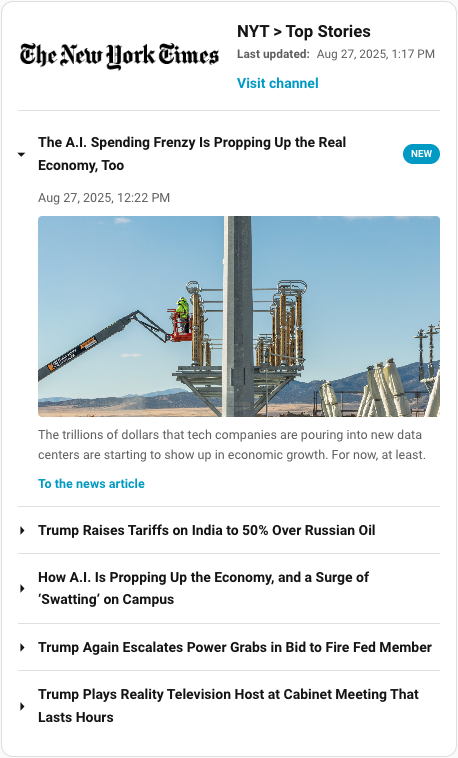
A custom Lovelace card for Home Assistant to display RSS feed items from a sensor (A better feedparser), (feedparser) or event entity (feedreader) in an accordion style.
- Flexible Data Source: Displays items from a
sensorentity (e.g., Feed Parser) or anevententity (e.g., corefeedreader). Supports both RSS feeds (using thepublishedfield) and Atom feeds (using theupdatedfield). - Multiple Feed Aggregation: Combine items from multiple RSS entities into a single card, automatically sorted by publication date.
- Accordion Layout: Each feed item is presented in a clean, collapsible accordion view, with an option to allow single or multiple items to be open at once.
- Customizable Display: Control the maximum number of items shown and optionally open the latest item or all items automatically on card load.
- Channel Information: Optionally display the feed's channel details, such as title, description, and image.
- Recent Item Indicator: A "NEW" pill highlights recent articles, with a configurable duration.
- Read/Unread Tracking: Visited article links are greyed out, making it easy to see what you've already read.
- Hero Images: Automatically displays a hero image if provided in the feed, and hides duplicate images from the summary to keep the layout clean.
- Persistent Bookmarking: Star your favorite items to save them permanently in your browser. Bookmarked items will remain visible even after they disappear from the live RSS feed.
- Built-in Audio Player: Includes an integrated player for feeds with audio enclosures, perfect for podcasts.
- Playback Persistence: Remembers your listening progress. Audio resumes where you left off after a refresh, and a "Listened" icon with a completion timestamp appears for finished tracks.
| The New York Times RSS | The Daily Audio Podcast RSS |
|---|---|
 |
 |
The editor is available in the following languages:
- English
- German
- French
Contributing Translations
If you would like to contribute a new translation:
- Fork the repository on GitHub.
- Copy the
src/translation/en.jsonfile and rename it to your language code (e.g.,es.jsonfor Spanish). - Translate all the values in the new file.
- Submit a pull request with your changes.
This card is available in the Home Assistant Community Store (HACS).

Manual Installation
- Download the
rss-accordion.jsfile from the latest release. - Place it in your
config/wwwdirectory. - Add the resource reference to your Lovelace configuration under
Settings->Dashboards->...->Resources.- URL:
/local/rss-accordion.js - Resource Type:
JavaScript Module
- URL:
You can now add the card to your dashboard.
| Name | Type | Default | Description |
|---|---|---|---|
type |
string | Required | custom:rss-accordion |
entity |
string | Required* | The entity ID of your feed sensor or event. *Either entity or entities is required. |
entities |
list | optional | A list of entity IDs to aggregate items from multiple feeds. Items are sorted by publication date. *Either entity or entities is required. |
title |
string | '' |
The title of the card. |
max_items |
number | All items | The maximum number of feed items to display. |
max_items_per_entity |
number | All items | The maximum number of feed items to extract from each configured entity. Useful for ensuring slower feeds are not entirely overwhelmed by high-volume feeds before the global max_items limit. |
new_pill_duration_hours |
number | 1 |
The duration in hours for which the "NEW" pill is shown on recent items. |
refresh_interval |
number | optional | The interval in minutes at which the card will automatically refresh the RSS feed entities. When set, the card will call the homeassistant.update_entity service for all configured entities at the specified interval. |
show_item_image |
boolean | true |
If false, hides the main image for each feed item. |
image_ratio |
string | auto |
The CSS aspect-ratio for item images (e.g., 16/9, 1.77). Images are cropped to fit. |
image_fit_mode |
string | cover |
How the image should fit. cover (fill & crop) or contain (fit inside). |
open_behavior |
string | none |
Determines which items are open by default when the card loads. Options: none (keep all closed), latest (open the newest item), or all (open all items). |
allow_multiple |
boolean | false |
If true, allows multiple accordion items to be open simultaneously. |
show_source |
boolean | Dynamic | If true/false, explicitly toggles the visibility of the feed's source next to each item. When displayed, it dynamically extracts the item's internal category or source metadata before falling back to the parent entity's name. By default, it is only shown when using multiple entities. |
show_audio_player |
boolean | true |
If false, hides the audio player for feed items that include an audio enclosure (e.g., podcasts). |
show_bookmarks |
boolean | false |
If true, enables a bookmarking feature, allowing you to star items and filter for them. |
show_channel_info |
boolean | false |
If true, displays the channel's info (title, description, image) above the feed items. This option is only available for entities that have a channel attribute (e.g. from the feedparser custom integration). |
show_channel_description |
boolean | true |
If false, hides the channel description. Only applicable if show_channel_info is true and a description exists. |
max_channel_description_length |
number | 180 |
The maximum number of characters to display for the channel description. Truncated descriptions will end with an ellipsis. Only applicable if show_channel_description is true. |
crop_channel_image |
boolean | false |
If true, displays the channel image as a 60x60px cropped circle. By default, the image is shown at 50% width without cropping. Only applicable if show_channel_info is true and a channel image exists. |
show_published_date |
boolean | false |
If true, displays the channel's last update time. Only applicable if show_channel_info is true and the sensor has a channel.published or channel.updated attribute. |
type: custom:rss-accordion
title: Home Assistant Blog
entity: sensor.home_assistant_blog_feed
max_items: 5
new_pill_duration_hours: 24
refresh_interval: 30
image_ratio: 16/9
image_fit_mode: covertype: custom:rss-accordion
title: News Aggregator
entities:
- sensor.tech_news
- sensor.local_news
- sensor.weather_alerts
max_items: 15
max_items_per_entity: 5
show_bookmarks: trueTo contribute to the development, you'll need to set up a build environment.
-
Clone the repository:
git clone https://github.com/timmaurice/lovelace-rss-accordion.git cd lovelace-rss-accordion -
Install dependencies:
npm install
-
Start the development server: This command will build for changes in the
srcdirectory and rebuild the card.npm run build
-
In your Home Assistant instance, you will need to configure Lovelace to use the local development version of the card from
dist/rss-accordion.js.
For further assistance or to report issues, please visit the GitHub repository.



