
The fair-code AI ad creation engine.
Generate cinematic fashion & luxury video ads using a multi-agent AI pipeline — from concept to final cut.





Examples · Quick Start · Agents · Vision · Changelog · Security · Contributing
OpenFrame AI is a full-stack AI-powered ad creation platform that orchestrates 7 specialized AI agents to produce professional video advertisements:
| Agent | Role |
|---|---|
| Creative Director | Campaign concept, title, tagline, mood |
| Brand Stylist | Color palettes, textures, visual identity |
| Product Stylist | Product descriptions and specs |
| Casting Scout | Cast members and settings |
| Cinematographer | Camera, lighting, color grading |
| Director | Shot list, scene breakdowns |
| Sound Designer | Voiceover scripts, music direction |
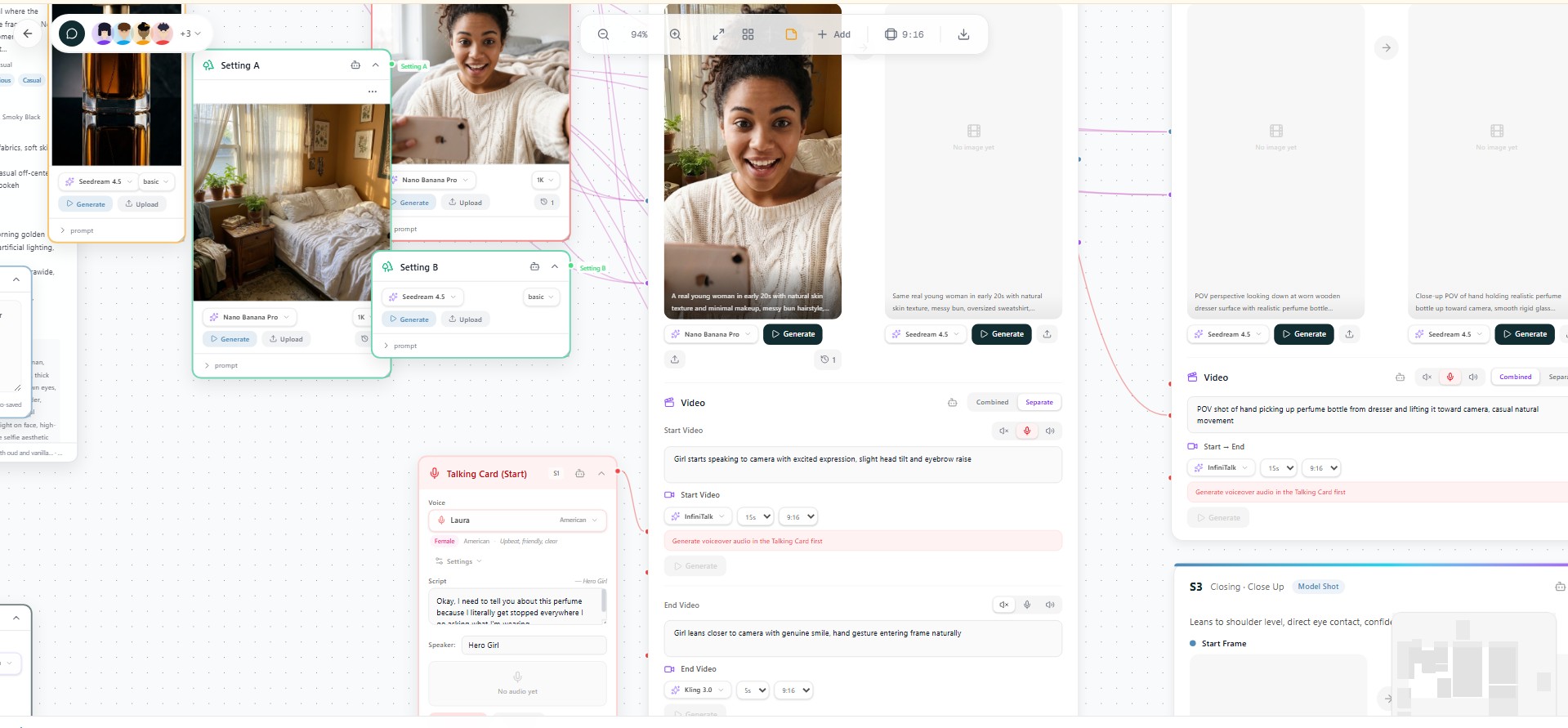
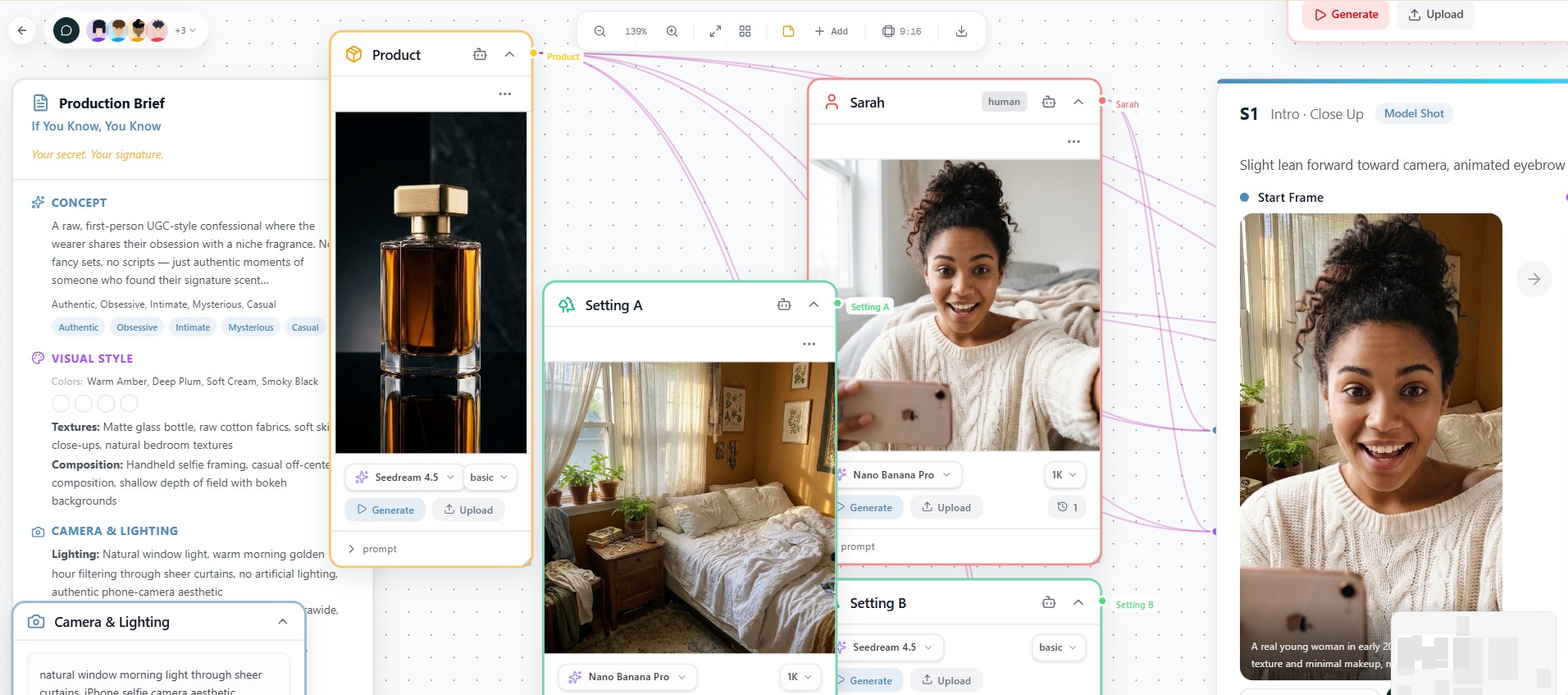
After agents run, you get a visual canvas where you can:
- Generate images for each asset (characters, products, settings)
- Generate start/end frames for every scene
- Generate videos from frames (text-to-video, image-to-video)
- Generate voiceovers and music
- Export SRT subtitles
- Fine-tune every prompt and re-generate
Get started quickly by importing one of the pre-built workflow files from the examples/workflows/ folder:
| Workflow | Ad Type | Description |
|---|---|---|
| luxury-leather-bag-enduring-craft.json | Fashion & Luxury | Premium leather bag editorial — moody, aspirational, cinematic |
| beauty-skincare-golden-hour-glow.json | Beauty & Skincare | Golden hour skincare ad — luminous, intimate, skin-focused |
| ugc-perfume-if-you-know.json | UGC / Social Media | Perfume micro-ad — raw, first-person, authentic |
To import: Open the app → click Import in the sidebar → select any .json file from examples/workflows/.
- Python 3.12+ — python.org
- Node.js 20+ — nodejs.org
- API Keys (see API Keys below)
git clone https://github.com/tapankumarpatro/openframe-ai.git
cd openframe-ai

# Backend
python -m venv venv
# Windows:
venv\Scripts\activate
# macOS/Linux:
source venv/bin/activate

pip install -r requirements.txt

# Frontend
cd ui
npm install
cd ..cp .env.example .env
# Edit .env and add your API keys (see API Keys section below)Windows:
.\start.ps1macOS / Linux:
chmod +x start.sh
./start.sh
Or run manually in two terminals:
# Terminal 1 — Backend
python -m uvicorn api.server:app --host 0.0.0.0 --port 8030 --reload

# Terminal 2 — Frontend
cd ui && npm run dev
Open http://localhost:3030 in your browser.
cp .env.example .env
# Edit .env with your API keys

docker compose up --build -d# Start all services (detached)
docker compose up -d
# Stop all services (preserves data)
docker compose stop
# Restart all services
docker compose restart
# Restart only the backend (e.g. after code changes)
docker compose restart backend
# Restart only the frontend
docker compose restart frontend# Rebuild and restart everything
docker compose up --build -d
# Rebuild only the backend
docker compose up --build -d backend
# Rebuild only the frontend
docker compose up --build -d frontend# View live logs (all services)
docker compose logs -f
# View only backend logs
docker compose logs -f backend
# View only frontend logs
docker compose logs -f frontend
# Health check
curl http://localhost:8030/api/health# Stop and remove containers (keeps images & volumes)
docker compose down
# Full cleanup (removes images too)
docker compose down --rmi all
# Nuclear: remove everything including volumes
docker compose down --rmi all -v| Service | URL |
|---|---|
| Frontend | http://localhost:3030 |
| Backend API | http://localhost:8030 |
| Health check | http://localhost:8030/api/health |
If running without Docker (two terminals):
# Terminal 1 — Backend
python -m uvicorn api.server:app --host 0.0.0.0 --port 8030 --reload

# Terminal 2 — Frontend
cd ui && npm run dev# Windows PowerShell — kill backend
Get-Process -Id (Get-NetTCPConnection -LocalPort 8030 -ErrorAction SilentlyContinue).OwningProcess -ErrorAction SilentlyContinue | Stop-Process -Force
# macOS / Linux — kill backend
lsof -ti:8030 | xargs kill -9
# Frontend: just Ctrl+C in the terminal# Kill existing backend and restart
$pid = (Get-NetTCPConnection -LocalPort 8030 -ErrorAction SilentlyContinue).OwningProcess | Select-Object -First 1
if ($pid) { Stop-Process -Id $pid -Force; Start-Sleep -Seconds 2 }
python -m uvicorn api.server:app --host 0.0.0.0 --port 8030 --reloadlsof -ti:8030 | xargs kill -9 2>/dev/null; sleep 2
python -m uvicorn api.server:app --host 0.0.0.0 --port 8030 --reloadOpenFrame AI uses external APIs for LLM reasoning, image/video generation, and voice synthesis. All keys are configured either in .env or via the in-app Settings panel.
| Service | Purpose | Required? | Get a key |
|---|---|---|---|
| OpenRouter | LLM agent calls (Claude, GPT, Gemini, etc.) | Yes | openrouter.ai/keys |
| kie.ai | Image & video generation (Seedream, Kling, etc.) | Yes | kie.ai |
| ImgBB | Image hosting for reference images | Recommended | api.imgbb.com |
| ElevenLabs | Voice synthesis for voiceovers | Optional | elevenlabs.io |
Tip: You can also set API keys at runtime via Settings > API Keys in the UI — no server restart needed.
- Python 3.12 + FastAPI — async API server
- LangGraph — multi-agent workflow orchestration
- LangChain + OpenRouter — LLM abstraction (supports 27+ models)
- SQLite + SQLAlchemy — local database
- SSE (Server-Sent Events) — real-time agent progress streaming
- Next.js 16 (App Router) + React 19 — UI framework
- React Flow (
@xyflow/react) — visual canvas for ad composition - Zustand — lightweight state management
- Tailwind CSS v4 — styling
- Framer Motion — animations
- Lucide — icon system
- OpenRouter — multi-model LLM gateway
- kie.ai — image generation (Seedream, Nano Banana, GPT Image, Z Image) + video generation (Kling, Wan, Veo, etc.)
- ElevenLabs — text-to-speech
- ImgBB — image hosting
- Multi-agent AI pipeline — 7 specialized agents collaborate on ad creation
- Visual canvas — drag, connect, and compose your ad visually
- Per-agent LLM model selection — choose Claude, GPT, Gemini, Llama, etc. per agent
- Ad type presets — Fashion, Commercial, Beauty, UGC, Cinematic
- Image generation — 4 providers with quality controls
- Video generation — 15+ models including Kling 3.0, Wan 2.1, Veo 3
- Audio modes — silent, audio-native, talking-head per scene
- Voiceover & music — ElevenLabs TTS + Suno/Udio music
- SRT subtitles — auto-generated from voiceovers
- Manual mode — build from scratch without AI agents
- Project folders — organize with drag-and-drop
- Import/Export — JSON workflow portability
- API cost tracking — monitor usage across all providers
- Docker support — one-command deployment
OpenFrame ships with 27 pre-configured models across 7 providers. Change models per-agent in Settings > Agent Models.
Five built-in presets shape agent behavior:
| Preset | Scenes | Style |
|---|---|---|
| Fashion & Luxury Editorial | 8–15 | Artistic, moody |
| Commercial / Product | 5–8 | Clean, bright |
| Beauty & Skincare | 5–10 | Intimate, luminous |
| UGC / Social Media | 1–3 | Raw, authentic |
| Cinematic Brand Film | 10–20 | Story-driven, epic |
| Document | Description |
|---|---|
| AGENTS.md | How the 7 AI agents collaborate (pipeline diagram, inputs/outputs) |
| VISION.md | Project roadmap, design philosophy, and future plans |
| SECURITY.md | API key handling, auth model, responsible disclosure |
| CHANGELOG.md | Version history and release notes |
| CONTRIBUTING.md | Development setup, PR process, how to add providers/agents |
We welcome contributions! See CONTRIBUTING.md for:
- Development setup guide
- How to add new image/video providers
- How to add new AI agents
- Branch naming and commit conventions
OpenFrame AI is fair-code distributed under the Sustainable Use License and the OpenFrame AI Enterprise License.
- Source Available — always visible source code
- Self-Hostable — deploy anywhere, free for personal & internal use
- Extensible — add your own agents, providers, and integrations
- Enterprise licenses available for additional features and commercial support
TL;DR: Free for personal use and internal business use. Cannot be resold or redistributed commercially. Enterprise features (files containing
.ee.) require a paid license.
Built with AI, designed for creators.
Agents · Vision · Changelog · Security · Contributing · License