
This Google Chrome extension facilitates the sending of WhatsApp messages via WhatsApp Web directly from your website or web application.
This extension exposes JavaScript functions that allow you to utilize them for sending both text and media messages to WhatsApp Web.
Important: To utilize this extension, ensure that WhatsApp Web is open and that you're logged in.
This extension serves as a bridge between your web application and WhatsApp Web.
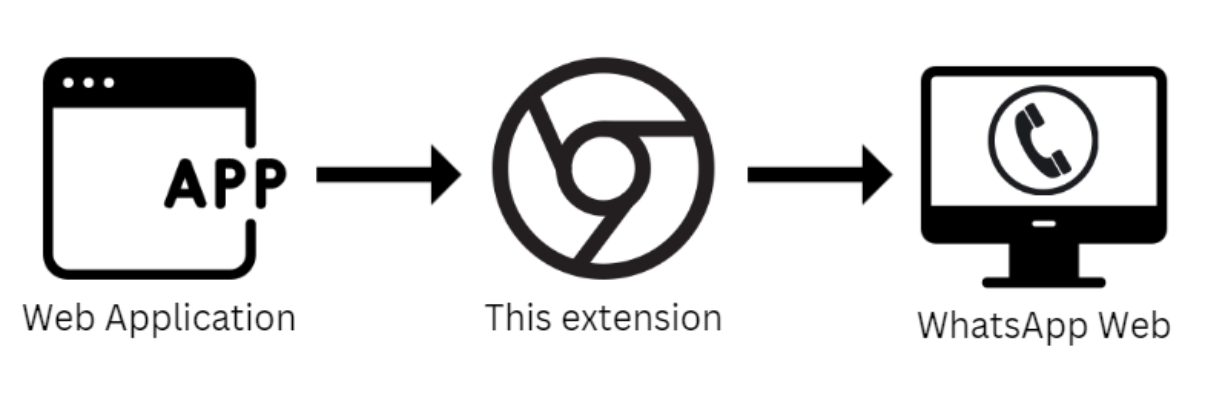
-
Install the Extension:
- Install the Google Chrome extension from Chrome Web Store
-
Open WhatsApp Web:
- Open WhatsApp Web in a browser tab and ensure you're logged in
-
Test the Extension:
- Use our hosted test page: Test WhatsApp Bridge Extension
After installation, your web application can access the functions provided by this extension. The extension provides two APIs:
All functions now return promises for better async handling:
// Using async/await (modern approach)
try {
    const response = await window.whatsappWebSuite.sendTextMessage(mobile, message);
    console.log('Message sent successfully:', response);
} catch (error) {
    console.error('Failed to send message:', error);
}

// Using .then/.catch
window.whatsappWebSuite.sendTextMessage(mobile, message)
    .then(response => {
        console.log('Message sent successfully:', response);
    })
    .catch(error => {
        console.error('Failed to send message:', error);
});// Send image, video, or any media file
try {
const response = await window.whatsappWebSuite.sendBase64Message(
mobile, // Mobile number with country code
base64Data, // Raw base64 data (without data URL prefix)
mimeType, // e.g., 'image/jpeg', 'video/mp4'
filename, // Display filename
message // Caption text
);
console.log('Media sent successfully:', response);
} catch (error) {
console.error('Failed to send media:', error);
}// Send media from URL
try {
const response = await window.whatsappWebSuite.sendUrlMediaMessage(mobile, url, message);
console.log('URL media sent successfully:', response);
} catch (error) {
console.error('Failed to send URL media:', error);
}For backward compatibility, you can still use the event-based approach:
// Send message (legacy way)
window.whatsappWebSuite.sendTextMessage(mobile, message);

// Listen for response (legacy way)
document.addEventListener('whatsappSendResponse', function(e) {
    if(e.detail.success) {
        console.log('Success:', e.detail.response);
    } else {
        console.log('Error:', e.detail.response);
    }
});<!DOCTYPE html>
<html>
<head>
<title>WhatsApp Media Test</title>
</head>
<body>
<input type="text" id="mobile" placeholder="918879331633" />
<input type="file" id="mediaFile" />
<textarea id="caption" placeholder="Check out this image! 📸"></textarea>
<button onclick="sendMedia()">Send Media</button>
<script>
async function sendMedia() {
const mobile = document.getElementById('mobile').value;
const caption = document.getElementById('caption').value;
const fileInput = document.getElementById('mediaFile');
if (!fileInput.files.length) {
alert('Please select a file');
return;
}
const file = fileInput.files[0];
try {
// Convert file to base64
const dataUrl = await fileToBase64(file);
const base64Data = dataUrl.replace(/^data:[^;]+;base64,/, '');
const response = await window.whatsappWebSuite.sendBase64Message(
mobile,
base64Data,
file.type,
file.name,
caption
);
alert('Media sent: ' + response.response);
} catch (error) {
alert('Error: ' + error.response);
}
}
function fileToBase64(file) {
return new Promise((resolve, reject) => {
const reader = new FileReader();
reader.onload = () => resolve(reader.result);
reader.onerror = reject;
reader.readAsDataURL(file);
});
}
</script>
</body>
</html>To create a .zip package for uploading to the Chrome Web Store Developer Dashboard:
npm run build:zipThis produces dist/wa-web-bridge-v<version>.zip containing only the files required by the extension (manifest, scripts, popup, icons). No node_modules, tests, or dev files are included.
- Mobile Number Format: Include the country code without spaces or special characters (e.g.,
918879331633for India) - WhatsApp Web Requirement: WhatsApp Web must be open and logged in
- Media Files: Supported formats include images, videos, documents, and audio files
- Base64 Data: When using
sendBase64Message, provide raw base64 data without the data URL prefix - Bulk Messaging: This extension is not designed for bulk messaging and may not be suitable for such use cases
Note: Both Promise-based and Event-based APIs work simultaneously - existing code will continue to work without changes.
This extension uses whatsapp-web.js library behind the scenes to interact with the WhatsApp Web API.