

Code Quality:
🌍 Read this in other languages: English | 日本語 (Japanese) (Note: The English documentation is AI-translated from the original Japanese).
A large-scale crowd simulator themed after a drone show, developed using C++ and DirectX 11.
While the graphics are kept simple, the project focuses on real-time control and performance optimization for 100,000 entities, driven by a custom Entity Component System (ECS) core architecture.
Following a JSON-defined timeline, massive numbers of entities autonomously transition between various formations and Boids crowd simulations.
This project was created to deeply understand and learn the mechanics of ECS architecture. Without relying on any external ECS libraries, a "pure C++ ECS core architecture based on Data-Oriented Design (DOD)" has been built entirely from scratch. I hope this serves as a useful implementation example and reference for Data-Oriented Design.
By introducing GPU Instancing, the system can smoothly run 100,000 Entities in real-time, including rendering. For simple tasks, it reaches the V-Sync limit (144 FPS), and even during complex simulations like Boids, it maintains around 120 FPS.
⚠️ Warning:
This demo features dense object clustering and flickering lights as part of the crowd simulation.
If you suffer from trypophobia or photosensitivity, please use caution when viewing the videos.
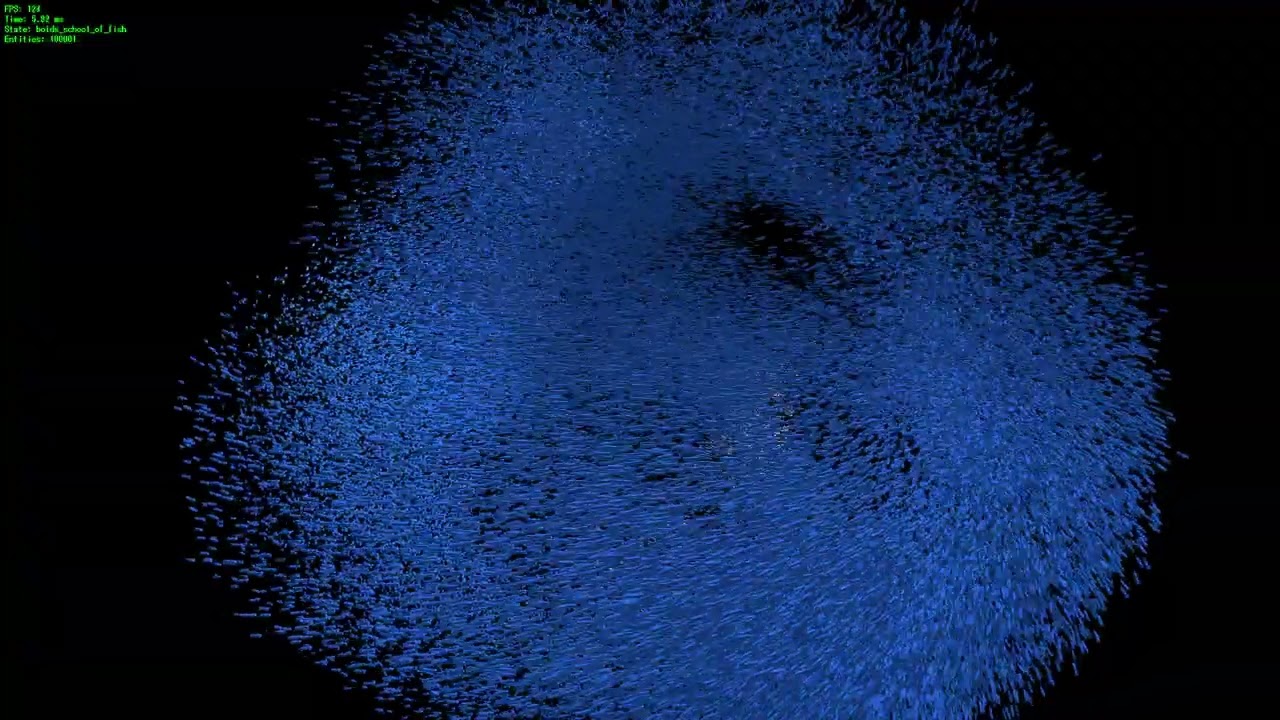
🐟 1. 100,000 Entity Boids Crowd Simulation (Click to Expand)
school_of_fish.mp4
A flocking simulation resembling a school of fish with 100,000 entities.
It achieves a smooth ~120 FPS by utilizingSpatialGridspatial partitioning and local caching for massive neighbor searches (Separation, Alignment, Cohesion), combined with GPU instancing and parallel processing.
🧊🐝 2. Geometric Formations and Organic Swarming (Click to Expand)
cube_to_insect_swarm.mp4
A demo transitioning from a wireframe shape to individual noise (Jitter/Wander) sequences.
While following macro-level vertex coordinates loaded from JSON, micro-level noise is processed by ECS systems, creating an organic, "insect swarm-like" undulation rather than a mechanical movement.
✨ 3. Full Sequence 4K Demo Video (YouTube)
Click the image to watch the full 4K/60FPS demo on YouTube.
Driven by a timeline, various Components (Boids, Formation Deployment, Spin Animations, Spatial Dynamics like Swirl, Orbit) are dynamically attached and detached, showcasing seamless state transitions throughout the entire sequence.
- Overview and Controls
- Environment & Build Instructions
- Design Philosophy and Architecture
- Performance Optimization and Trade-offs
- Directory Structure
- Future Plans
- Contributing
- License
| Item | Description |
|---|---|
| Language | C++20 |
| Rendering | DirectX 11 (GPU Instancing) |
| Window Management | GLFW 3.4 |
| Debug UI | Dear ImGui 1.92.8 |
| Data Parsing | nlohmann/json 3.12.0 |
| Noise Generation | OpenSimplex Noise |
| Test Framework | Google Test |
| Item | Description |
|---|---|
| Initial Entities | 50,000 |
| Max Entities | 100,000 (Can be dynamically added/removed via key input) |
In this demo, massive drone entities transition their behavior in real-time according to a timeline defined in JSON.
In each sequence, various Components are dynamically attached and detached:
- Formation Tracking
- Boids Crowd Simulation
- Spatial Dynamics (Orbit, Lift, Attraction, Swirl, Gravity, etc.)
- Random Noise/Fluctuations (Jitter, Wander, Dart, etc.)
- Color Fade/Blink Animations
- Spin Animations and Entire Formation Rotations
All sequence content is defined in external JSON files, allowing you to change the visual presentation without modifying any C++ code.
About Switching Timelines
You can switch the timeline that plays just by changing timeline.playName in data/config/game_config.json.
playName |
Description |
|---|---|
DroneShow (Default) |
Full demo with various sequences like formations, Boids swarms, spatial dynamics. |
PictureShow |
A simple PointCloud demo where drones draw pictures. |
| Key | Action |
|---|---|
1 |
Spawn 1,000 more entities |
2 |
Remove 1,000 entities |
3 |
Toggle Overlay Debug Display |
4 |
Toggle 3D Debug Display (Requires Debug::Config::IsEnabled) |
ESC |
Exit |
- OS: Windows 10 / 11 (64-bit)
- IDE: Visual Studio 2022
- Language: C++20
- Test Environment:
- CPU: Intel® Core™ Ultra 7 Processor 265K
- RAM: 64 GB
This project uses the following external libraries:
- GLFW (ver 3.4): Window management and input handling
- Dear ImGui (ver 1.92.8): Debug UI overlay
- nlohmann/json (ver 3.12.0): Parsing external data (Prefabs / Timelines)
- OpenSimplex Noise: Noise generation (Wander / Fluctuations)
- Google Test: Unit Testing
Note: The necessary headers and static libraries are bundled in the External/ directory with relative paths already configured. You can build and run it immediately without complex environment setups.
This solution (ECSEngine.sln) consists of four projects:
| Project | Type | Role |
|---|---|---|
ECSEngine |
Static Library | Game-agnostic engine layer (ECS core, physics, rendering base, etc.) |
DroneShow_Game |
Static Library | Drone show specific game logic (Systems, Components, Managers, etc.) |
DroneShow_App |
Executable | Entry point (main.cpp) linking the above two libraries to run. |
DroneShow_Test |
Executable | Unit tests (Google Test) including tests for both ECSEngine and DroneShow_Game. |
The dependency tree is as follows:
DroneShow_App
  ├── DroneShow_Game  (Static Link)
  └── ECSEngine       (Static Link)

DroneShow_Test
  ├── DroneShow_Game  (Static Link)
  └── ECSEngine       (Static Link)

*Note: DroneShow_Game internally depends on ECSEngine (Engine Core).
This project uses CMake as its build system. You can easily set up the environment using Visual Studio's native CMake support.
- Clone the Repository
- Clone (or download and extract) this repository to a directory of your choice.
- Open the Folder in Visual Studio
- Launch Visual Studio and select "Open a local folder". Choose the cloned directory (the root folder containing the main
CMakeLists.txt).
Note: We no longer use legacy solution files (.sln).
- Launch Visual Studio and select "Open a local folder". Choose the cloned directory (the root folder containing the main
- Wait for CMake Auto-Configuration
- Once the folder is opened, Visual Studio will automatically start configuring CMake in the background (fetching required libraries and resolving paths). Please wait until "CMake generation finished." appears in the Output window.
- Select the Build Configuration
- To experience the maximum performance of this demo (simulating 10,000+ drones), we highly recommend selecting
x64-Releasefrom the build configuration drop-down menu at the top.
(Thex64-Debugbuild lacks optimizations and may result in a significant drop in FPS.) Note: Ifx64-Releaseis not available in the drop-down, select "Manage Configurations", click the green add button (+), and add/savex64-Release.
- To experience the maximum performance of this demo (simulating 10,000+ drones), we highly recommend selecting
- Run (F5)
- Select
DroneShow_App.exefrom the "Startup Item" drop-down menu (next to the green play button) at the top of the screen. Simply click the play button (or pressF5) to build and run the application.
- Select
- Run Unit Tests
- If you want to run and check the unit tests (Google Test), switch the Startup Item to
DroneShow_Test.exeand run it (F5).
- If you want to run and check the unit tests (Google Test), switch the Startup Item to
This project was developed based on the following features and design philosophies.
- ECS implemented fully from scratch.
- Fixed timestep + phase/order pipeline.
- Parallel System execution via ThreadPool + ParallelFor.
- Safe, thread-friendly ECS updates via DeferredCommand.
- Boids optimization using SpatialGrid + Cache.
- JSON-based Timeline / Prefab / Formation control.
- Verified simulation scaling up to 100,000 Entities.
- Loosely Coupled, Open to Extension:
Dependency between systems and components is minimized. The architecture is designed so adding new features has a minimal impact on existing code. - Separation of Generic Engine and Application Layers:
The "generic ECS base usable in other projects" and the "drone show specific game logic" directories are clearly separated to ensure high reusability. - Faster Iteration via Data-Driven Design:
Timelines and parameters are defined as external JSON data, allowing you to tweak visual presentations without recompiling C++.
ECS was adopted to separate data and logic, enabling efficient management of massive numbers of entities.
For educational purposes, the core is implemented from scratch without relying on external libraries.
💡 About Architecture Diagrams
For the overall core architecture and class dependencies, please refer to the included Class Diagram (diagram.mmd).
This project emphasizes minimizing changes to existing code when adding features.
For example, to add a new behavior, you simply:
- Define a new Component
- Implement the corresponding System
- Define JSON data
Adding these alone makes it work.
By avoiding branching (if/switch) in existing Systems and keeping logic separated via ECS data and Traits, the features remain loosely coupled.
Each System registers its required component combinations as a std::bitset Signature.
Whenever components are added or removed, the Signature is checked, and the System's target processing list is automatically updated.
This completely eliminates the cost of Systems processing irrelevant entities.
Component characteristics are centrally declared using constexpr template specialization.
This allows for static switching of behaviors per component with zero runtime cost.
To clarify responsibilities, traits are divided into Engine characteristics (ComponentTraits) and Game-specific characteristics (SequenceTraits).
Engine-Dependent Traits (ComponentTraits)
| Trait | Meaning |
|---|---|
CoreComponent |
If true, automatically attached upon any entity creation. |
HasCreationTime |
If true, the absolute time is automatically written to creationTime when attached. |
SeedPolicy |
Specifies the seed generation policy (Entity-dependent, random, etc.). |
HasInitializer |
If true, the component has custom initialization logic. |
Game-Dependent Traits (SequenceTraits)
| Trait | Meaning |
|---|---|
DataDriven |
If true, automatically registered to the factory registry and can be dynamically generated from JSON. |
SyncOnCatchUp |
If true, copies values from existing entities to synchronize when spawned mid-simulation. |
Target |
The target for component attachment (entire System, or Scene). |
OneShot |
If true, it is deleted immediately after being attached and applied once. |
// To add a new data-driven component, simply write a specialization:
template<>
struct SequenceTraits<MyComponent> : DefaultSequenceTraits {
    static constexpr bool DataDriven = true;
};
ComponentFactoryRegistry and various systems reference these traits via if constexpr.
This allows safe declaration and bulk registration of new component properties without writing branching code.
This project does not rely on hardcoded values in source code; instead, it initializes everything based on data/config/game_config.json at startup.
The rough setup flow in Game::Init() is as follows:
- Load Config:
Parsesgame_config.jsonusing the genericJsonLoaderto retrieve base settings like window size, directory paths, and initial spawn counts. - Initialize Base and Managers:
Initializes the window and DirectX 11 rendering context (GLFW / D3D11), sets up the graphics rendering base, and then creates managers likePrefabManagerandTimelineManager. - ECS Registration:
Registers all components and systems viaGameRegistrations::RegisterAllComponents()andRegisterAllSystems()(Components withSequenceTraits<T>::DataDrivenenabled are automatically added toComponentFactoryRegistry). - Load External Data:
After registration, file traversal mechanisms likeDirectoryLoaderare used to batch-load Prefab and Timeline JSON data from target directories. - System Setup:
Establishes dependencies between systems (sharing the spatial grid, timeline data, etc.) viaSetupSystems(), and triggers initialization for each system (InitSystems()). - Spawn Initial Entities:
Spawns initial entities by callingPrefabManager::Instantiate()based on the config settings.
By extracting file loading responsibilities into the Loaders/ directory, the architecture features a centralized, safe data-loading mechanism. A strict data-driven approach right from the entry point allows the C++ side to focus purely on "how to process data".
The frame loop is divided into 4 phases, where physics calculations run on a fixed timestep.
Input   → Logic   → Physics (Fixed 60Hz) → Render
                        └─ May run multiple times depending on fixedAccumulator
Within each phase, an Order is defined to execute Systems based on data dependencies.
enum class LogicOrder
{
    PreUpdate               = 0,    // Input processing, previous frame cleanup, etc.
    Update                  = 10,   // User main logic
    ApplyRequest            = 20,   // Request → Runtime conversion
    PostUpdate              = 30,   // State transitions
    EventProcess            = 40,   // Event handling
};

enum class PhysicsOrder
{
    PreSimulation           = 0,  // Pre-processing
    SpatialPartition        = 10, // Spatial grid construction
    SpatialCache            = 20, // Spatial cache building
    ForceClear              = 30, // Clear forces
    TargetGenerator         = 40, // Target generation
    TargetModifier          = 45, // Target modification
    DirectionGenerator      = 50, // Direction generation
    ForceGenerator          = 60, // Force generation
    Steering                = 70, // Steering behavior
    VelocityGenerator       = 80, // Force -> Velocity
    VelocityModifier        = 83, // Add velocity modifiers (Noise jitter, wind)
    VelocityDamping         = 86, // Velocity damping (Air resistance)
    Constraint              = 90, // Constraints
    TransformIntegration    = 100, // Velocity -> Transform
    Rotation                = 110, // Rotation processing
    PostTransform           = 120, // Post-transform processing
    MaterialModifier        = 130, // Visual synchronization
    Finalize                = 140, // Cleanup
};

enum class RenderOrder
{
    Background              = 0,    // Background
    Opaque                  = 10,   // Opaque objects (PrimitiveMesh)
    Transparent             = 20,   // Transparent/Particles
    UI                      = 30,   // UI on top
};
For instance, BoidsSystem must run after SpatialGrid is built, and Velocity systems must run after Force is generated.
By separating each System into responsibilities of "what it generates" or "what data it modifies", we control them sequentially as a pipeline.
This achieves:
- Clear data dependencies
- Lower coupling between Systems
- A highly parallelizable structure
- Prevention of update-order dependent bugs
💡 About Execution Pipeline Diagrams
For the strict execution order and data flow of Systems in these phases, please refer to the included Execution Flowchart (lowchart.mmd).
By defining component additions and parameter tweaks as external data, the iteration speed is drastically improved.
All presentation content is defined in JSON files, structurally allowing non-engineers to edit it.
{
  "sequences": [
    {
      "name": "formation_torus_knot",
      "duration": 10.0,
      "components": {
        "FormationComponentWireframe": {
          "file": "data/formation/json/torus_knot.json",
          "scale": 400.0
        },
        "OrbitComponent": {
          "axis": [0.0, 1.0, 0.0],
          "speed": 0.15
        }
      }
    }
  ]
}TimelineDirectorSystem manages timeline progression. Upon sequence switching, it directly attaches (or removes) the components defined in JSON to each Entity.
Fundamentally, the component itself represents a "state definition". Components described in the sequence are simply attached, and their corresponding Systems read them to perform processing.
For example, attaching BoidsComponent makes BoidsSystem perform crowd simulation; attaching SpeedConstraintComponent applies speed limits via SpeedConstraintSystem.
However, for special cases, a Request Component pattern is utilized:
- One-Shot Processing: Like
RandomVelocityRequestComponent, which only needs to process once upon attachment. The corresponding RequestSystem automatically removes the request component after processing. - State-Dependent Initialization: For
ColorFadeRequestComponent, it needs to record the "currentMaterialComponentcolor" as the start color. TheColorFadeRequestSystemreads the current state when it receives the request, converting it into the actualColorFadeComponentfor execution. This cleanly separates initialization logic from execution logic within the ECS.
In this demo, drones can be added or removed dynamically via keyboard input. To prevent newly added drones from acting like they are "at the beginning of the show" and breaking the crowd's movement, a two-step synchronization is implemented:
- CatchUpNewEntity Component Tracking
On spawn,TimelineDirectorSystem::CatchUpNewEntityis called to instantly attach components currently active in the sequence to the new Entity (and copy parameters from existing drones). - Synchronization via Absolute Timestamp
Instead of giving each component a local timer, the "absolute time the sequence started" is recorded in the component. The progression state is calculated based on the difference fromTime::GetTotalTime().
This architecture ensures that no matter when an Entity is added, it seamlessly joins the exact sequence progression state without looking out of place.
The initial component makeup of a spawned Entity is defined in JSON.
Because ComponentFactoryRegistry parses JSON and safely generates components (ApplyOperation), you only need to pass a prefab name to Instantiate() to automatically attach the right components.
By centralizing factory processing into the Registry, duplicated code often scattered across systems and managers is eliminated.
// data/prefab/drone_cube.json
{
  "name": "DroneCube",
  "components": {
    "PrimitiveMeshComponent": { "type": "Cube", "scale": [5.0, 5.0, 5.0] },
    "MaterialRequestComponent": { "color": [255.0, 255.0, 255.0] },
    "DampingComponent": {},
    "DroneComponent": {}
  }
}When adding a new type of drone, you can handle it just by adding a JSON without changing the code.
Instead of hardcoding vertex data in C++, a pipeline is built to seamlessly import data generated by external tools and scripts.
| Formation | Generation Method | Overview |
|---|---|---|
| Torus Knot / Superformula | Math Scripts | Calculates vertices from mathematical formulas (knots, natural shapes) into JSON. |
| 3D Models (Wireframe) | obj_to_json.py |
Converts .obj files into JSON for wireframe (single-stroke) rendering. |
| Image Data (PointCloud) | image_to_json.py |
Parses any image file into a 3D PointCloud JSON with colors and coordinates. |
Because of this, drawing pictures with PointCloud drones can be executed instantly just by running an image through a script and placing the JSON in the directory.
For a full list of all available components in Prefab and Timeline JSONs, as well as parameter details, see the dedicated reference document:
This project adopts the following optimization principles (Data-Oriented Design) to realize large-scale simulations:
- Memory Layout-Aware Design:
Pre-allocates buffers to avoid runtime allocations, and manages Components to guarantee contiguous memory access, continuously maximizing CPU cache hit rates. - Eliminating Heavy Calculations:
Inside update loops run by 10,000+ entities every frame, heavy math functions likesqrtare avoided (replaced by squared distance comparisons) to suppress CPU load as much as possible. - Thread Safety Built for Parallelism:
While splitting heavy calculations across threads withParallelFor, the DeferredCommand pattern is utilized to prevent data races when components are dynamically added/removed.
Component data is managed using the Sparse-Dense Set pattern.
Inside ComponentArray<T>, there is a std::vector<T> (Dense Array) that stores the actual data packed tightly, and an EntitySparseSet to look up the Dense Array index from an Entity ID in O(1) time.
1. Ensuring Memory Contiguity with Swap-and-Pop
When a component is removed from an Entity, the last element in the Dense array is swapped into the deleted position to fill the gap (Swap-and-Pop). Because of this, data is always packed into contiguous memory, making CPU prefetching highly effective.
2. Obtaining References Outside the Loop
Each System calls GetComponentArray<T>() once outside its loop to get a reference to the entire array.
Inside the loop, data is accessed in O(1) via GetData(entity), eliminating indirect referencing costs (pointer-to-pointer) and heavy hash map lookups.
// Get array references outside the loop (Cache-friendly)
auto& transformArray = coordinator.GetComponentArray<TransformComponent>();
auto& velocityArray  = coordinator.GetComponentArray<VelocityComponent>();

ParallelFor(totalEntities, [&](int startIdx, int endIdx) {
    // High-speed loop with guaranteed contiguous memory access
    for (int i = startIdx; i < endIdx; ++i) {
        auto& transform = transformArray.GetData(entities[i]);
        auto& velocity  = velocityArray.GetData(entities[i]);
        // ...
    }
});A custom ThreadPool is implemented, utilizing std::condition_variable sleep waits to reduce CPU consumption while idle.
Each System's Update processing is divided into chunks based on CPU cores using ParallelFor and dispatched to Worker threads.
Initially, threads were created per task, but due to creation overhead, it was transitioned to a ThreadPool. Systems divide Entities among threads to optimize processing.
Calling ECS component add/remove operations directly from inside a ParallelFor worker thread would cause simultaneous writes to ComponentArray internal structures (Dense/Sparse arrays), resulting in data races.
To prevent this, the DeferredCommand Pattern is adopted.
Worker Thread
  └─ Calls coordinator.DeferAssignComponent<T>(entity, component); or
     coordinator.DeferRemoveComponent<T>(entity);
           ↓
Main Thread (at the end of each UpdatePhase())
  └─ Internal FlushCommands() executes context sequentially from all threads.
The Coordinator has utility functions for deferred processing. Calling these automatically queues commands into thread-local buffers (ThreadCommandContext), avoiding race conditions. This allows systems to safely execute structural changes (like component addition/removal) transparently even from within parallel loops.
In crowd simulations like Boids, it is necessary to determine behavior by referencing surrounding Entities.
This usually incurs higher reference costs than standard ECS Systems, becoming a massive load factor in large-scale environments.
This project implements spatial partitioning and cache optimization to address this.
SpatialGrid divides 3D space into grid cells, managing Entities by the cell they belong to.
Instead of a brute-force search against all Entities, BoidsSystem only searches:
- The cell the Entity is in
- Adjacent cells
This drastically reduces the computational complexity of neighbor searches.
BoidsSystem frequently references the Position and Velocity of other Entities.
Due to the nature of ECS, the memory locations of referenced Entities are not strictly continuous, causing memory access costs from cache misses.
Thus, BoidCacheSystem aggregates the necessary data for Boids into a flat, contiguous memory space in advance, building a cache that allows continuous access to Entities in the same cell.
This achieves:
- Improved memory locality
- Reduced cache misses
- Better scan efficiency in BoidsSystem
Even with spatial partitioning and caching, if all Entities perform strict neighbor searches every frame, the CPU takes a huge hit at the tens-of-thousands scale.
Therefore, BoidsSystem uses Time Slicing: each Entity calculates neighbor forces at regular intervals (updateInterval) instead of every frame.
- On skipped frames, the directional vector cached from the last calculation (
cachedDirection) is reapplied as the Force. - To prevent all Entities from updating simultaneously, the interval is multiplied by a random scale (
updateIntervalScale), evenly distributing the CPU load across frames (Load Balancing).
Because crowd movement changes gradually between frames, reusing calculations for a few frames causes almost no visual discrepancy, dramatically preventing frame rate drops.
Initially, the project issued draw requests per Entity. After transitioning through dynamic batching (packing all vertex data into one buffer), it now utilizes GPU Instancing. Transform and color data per instance are stored in a single structured buffer, referenced by Instance ID in the shader, keeping draw calls to an absolute minimum regardless of Entity count. This enables the scalability of running 100,000 Entities at V-Sync limits.
To maximize multithreading benefits even in rendering, PrimitiveMeshRenderSystem uses a Thread-Local Buffer pattern.
Gathering draw data to sending it to the GPU consists of 6 steps:
[1] Parallel Gathering Phase (ParallelFor / Lock-Free)
    Worker threads write InstanceData (World Matrix, Color) into their own
    dedicated buffers (ThreadLocalBuffer).
    * World Matrix built as TRS(position, rotation, mesh.scale)
          ↓
[2] Size Pre-calculation
    Sums entry counts of all thread buffers per Batch ([Shader × Mesh]),
    reserving final buffer capacity.
          ↓
[3] Final Buffer Reset (Clear + Reserve)
    Clears the previous frame's buffer and reserves the needed amount to
    avoid reallocations inside the frame loop.
          ↓
[4] Merge Phase (Single Thread / Gather)
    Concatenates thread-local buffers into the final Batch buffers.
          ↓
[5] Submit Phase (DrawInstanced × Batch Count)
    Calls RenderManager::DrawInstanced once per [Shader × Mesh] combination,
    completing rendering for all entities.
          ↓
[6] Cleanup
    Clears thread-local buffers (memory is reused, not freed).
Lock-Free Mechanism: In the gather phase, threads identify their own buffer via ThreadPool::GetCurrentWorkerIndex() and write without mutual exclusion. The merge phase runs on the main thread after all workers finish, meaning no mutexes are required.
Eliminating In-Frame Allocations: Capacity based on thread count is reserved during Init(), preventing realloc in the frame loop. The final buffer only needs clear() + reserve(), avoiding costly OS memory allocations.
Optimized Drawing by [Shader × Mesh] Batch Index: ThreadLocalBuffer holds a flat array of NUM_SHADERS × NUM_MESH_TYPES (GetBatchIndex(shader, mesh)). By binning entities using their MaterialComponent::shaderType and PrimitiveMeshComponent::type combination, all entities with the same shader and mesh type are drawn in a single DrawInstanced call, minimizing state change overhead.
To prioritize ECS cache efficiency and runtime performance, each ComponentArray pre-allocates memory for the maximum number of Entities. This suppresses:
- Runtime reallocations
- Pointer invalidation
- Memory fragmentation
- Excessive random access
While it maintains stable memory access performance under high load, this maximum pre-allocation means memory usage is relatively high. This is a calculated trade-off prioritizing DOD cache optimization. If physical memory runs low, OS paging (swapping) might occur, which would cause significant performance drops.
Verifications were run in large-scale simulation environments including Boids, Steering, Force Accumulation, and Animation.
| Condition | Single Thread | Multi Thread |
|---|---|---|
| 100,000 Entities (Rendering ON / GPU Instancing, simple tasks) | ~100 FPS | 144 FPS (V-Sync Limit) |
| 100,000 Entities (Rendering ON / GPU Instancing, complex tasks like Boids) | ~10 FPS | ~120 FPS |
- With GPU Instancing, simple processing of 100,000 Entities hits the V-Sync limit (144 FPS).
- In complex simulations (like Boids requiring neighbor searches), CPU load is dominant, but multithreading sustains ~120 FPS.
- In single-threaded mode during Boids, FPS plummets to ~10 FPS, confirming that load balancing via
ParallelForis extremely effective here. - The ECS / Physics / Boids processing scales well with parallel execution.
While multithreading offers high and stable performance, temporary frame drops (spikes) can occur when transitioning sequences (e.g., Boids to Formation).
The main cause is the structural reorganization cost of the ECS via TimelineDirectorSystem.
Upon switching sequences, components are added/removed across massive numbers of entities simultaneously (altering Signatures). This triggers synchronous updates to cache lists (EntitySparseSet) inside every System millions of times instantly, causing a CPU spike. This currently runs single-threaded, but future iterations will consider queuing structural changes into deferred buffers to be executed in batches safely.
After introducing GPU instancing, the Visual Studio Profiler tracked hot spots during Boids execution (high load). The result: There is no single glaring bottleneck; CPU time is distributed across logic computations.
| Function Name | Total CPU % |
|---|---|
BoidsSystem::Update (lambda) |
18.96 % |
Quaternion::Slerp |
5.53 % |
Quaternion::LookRotation |
5.06 % |
PrimitiveMeshRenderSystem::Update (lambda) |
9.17 % |
Quaternion::Normalize |
4.83 % |
acosf_fma |
4.12 % |
OpenSimplex2S::noise3_BCC |
4.06 % |
cosf / sinf |
~3.9 % each |
memcpy_repmovs |
3.05 % |
SpatialBoidCacheSystem::Update |
2.68 % |
JitterMovementSystem::Update (lambda) |
2.21 % |
WanderSystem::Update (lambda) |
1.85 % |
Calculations are finely distributed. Optimizing just one element would have a limited impact on the overall frame, which is an expected outcome of the previous optimizations (GPU Instancing, ParallelFor, Boids time-slicing, avoiding sqrt).
BoidsSystem is the biggest hot spot because it combines neighbor searching, the 3 rules, and Quaternion math. Rendering cost (PrimitiveMeshRenderSystem) sits at 9.17%, massively reduced compared to the old Dynamic Batching era, shifting the bottleneck almost entirely to the simulation logic side.
ECSEngine/                                    ... Repository Root
├── ECSEngine/                                ... [Static Lib] Generic Engine Layer
│   └── src/Engine/
│       ├── ECS/                            ... ECS Core Implementation
│       │   ├── Coordinator.h / .cpp        ... ECS Coordinator
│       │   ├── ComponentManager.h          ... Component Management
│       │   ├── SystemManager.h             ... System / Phase Management
│       │   ├── EntityManager.h / .cpp      ... Entity Creation / Destruction
│       │   ├── EntitySparseSet.h / .cpp    ... Sparse-Dense Set Impl
│       │   ├── ComponentArray.h            ... Component Data Arrays
│       │   ├── SystemPhases.h              ... Phases and Order definitions
│       │   └── ...
│       ├── Components/                     ... Generic Component Definitions
│       │   ├── CoreComponents.h
│       │   ├── PhysicsComponents.h
│       │   ├── ForceComponents.h
│       │   ├── AnimationComponents.h
│       │   └── ...
│       ├── Systems/                        ... Generic System Implementations
│       │   ├── Animation/
│       │   ├── Behavior/
│       │   ├── Force/
│       │   ├── Physics/
│       │   ├── Render/
│       │   ├── Scene/
│       │   └── Spatial/
│       ├── Math/                           ... Vector3, Quaternion, Color, Constants
│       ├── Physics/                        ... Physics Helpers
│       ├── Platform/                       ... Thin Platform Wrappers
│       ├── Render/                         ... GPU Instancing / Render Base
│       ├── Spatial/                        ... SpatialGrid
│       ├── Traits/                         ... ComponentTraits.h
│       ├── Debug/                          ... Debug Displays
│       └── Utils/                          ... ThreadPool, Time
│
├── DroneShow_Game/                           ... [Static Lib] Game-specific Logic
│   ├── src/Game/
│   │   ├── Game.h / Game.cpp               ... Main Game Class (Init/Loop)
│   │   ├── Components/                     ... Game-specific Components
│   │   │   └── GameComponents.h
│   │   ├── Systems/                        ... Game-specific Systems
│   │   │   ├── TimelineDirectorSystem.h / .cpp
│   │   │   ├── FormationSystemWireframe.h
│   │   │   └── FormationSystemPointCloud.h
│   │   ├── Managers/                       ... Various Managers
│   │   │   ├── InputManager.h
│   │   │   ├── PrefabManager.h / .cpp
│   │   │   └── TimelineManager.h / .cpp
│   │   ├── Loaders/                        ... Generic Data Loaders
│   │   │   ├── DirectoryLoader.h
│   │   │   └── JsonLoader.h
│   │   ├── Registry/                       ... Component/System Registry
│   │   │   ├── ComponentRegistry.h
│   │   │   ├── SystemRegistry.h
│   │   │   ├── Components/
│   │   │   └── Systems/
│   │   ├── Parsers/                        ... JSON Parsers
│   │   ├── Traits/                         ... Game-specific ComponentTraits
│   │   └── Registration/                   ... Factory Registration
│   └── data/                               ... External Data
│       ├── config/                         ... game_config.json
│       ├── formation/
│       │   ├── json/                       ... Formation vertices (JSON)
│       │   └── obj/                        ... OBJ files (converted via script)
│       ├── prefab/                         ... Prefab definitions (JSON)
│       ├── shader/                         ... GPU Instancing Shaders
│       └── timeline/                       ... Timeline definitions (JSON)
│
├── DroneShow_App/                            ... [Executable] Entry Point
│   └── src/
│       └── main.cpp                        ... WinMain
│
├── DroneShow_Test/                           ... [Executable] Google Tests
│   ├── Engine/
│   │   ├── ECS/                            ... ECS Core Tests
│   │   └── Systems/                        ... Engine System Tests
│   └── Game/
│       └── Systems/                        ... Game System Tests
│
├── External/                               ... Third-Party Libraries
├── docs/                                   ... Documentation (Class/Flow diagrams)
└── script/                                 ... Formation Generation Scripts (Python)
[Render Optimization]
- Further optimization of Instancing shaders (LOD / Culling).
[ECS Optimization]
- Reduce spikes during sequence switches (Deferred evaluation of structural changes).
- Further math optimizations using SIMD instructions.
[Feature Expansion]
- Implement Camera Animation features synced with sequence data.
[Development Workflow]
- Increase Unit Test coverage for all Systems.
- Implement Hot Reloading for config files to speed up parameter tweaking.
- Implement an Error Logging system.
Because this repository is primarily published for educational purposes and as an implementation example, Pull Requests (PRs) are generally not accepted. If you have bug reports or questions regarding functionality/implementation, feel free to open an Issue.
This project is licensed under the MIT License.
This project uses the following external libraries. For detailed license information for each library, please refer to the THIRD_PARTY_LICENSES file.
- GLFW: zlib/libpng License
- Dear ImGui: MIT License
- nlohmann/json: MIT License
- OpenSimplex Noise: The Unlicense / CC0 1.0 Universal (Public Domain)
- Google Test: BSD-3-Clause License
Some images used as source data for PointCloud generation in this project are public domain open-access images provided by external institutions.
- The Metropolitan Museum of Art (The Met): CC0 1.0 Universal (Public Domain)