


English · Français
Alt+Shift+B (overwrites Arc’s default boon table hotkey) or checkbox in the arc options
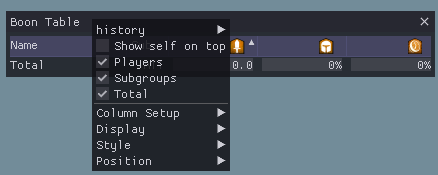
Right-click for options to change column visible and other settings.
Table columns can be reordered by dragging the column header.
Sort by column by clicking on the header, it is sorted by character name by default.
- Players: Show/Hide all players in the table (Default: ON)
- Subgroups: Show/Hide subgroup average (Default: ON)
- Total: Show/Hide group/squad average (Default: ON)
- NPCs: Show/Hide boons of NPCs (Default: ON)
- only available for 3 encounters (Deimos, Escort, and River of Souls)
- Column Setup: Show/Hide the columns of the table.
- Style: Styling options for this window.
- Show value as progress bar: Shows values as a progress bar in addition to the actual number (Default: ON).
- Alternating Row Background: Show/Hide background colors to better distinguish rows (Default: ON).
- Show header with text instead of images: Change the header images back into normal text (Default: OFF).
- Hide window header: Hide the header of the ImGui window. The table header will still be there (Default: OFF).
- Show only your subgroup: In the player section, show only the players that are in your subgroup (Default: OFF).
- Show only yourself: In the player section, show only yourself (Default: OFF).
- Coloring Mode: How to color the text/progress bars. Can be Default (Gray), By percentage (red to green) and By Profession (Default: Default).
- Alignment: Align the text to the column. Can be Left, Right, Center, and Unaligned. Unaligned means that it is as far left as possible, without being on top of the progress bar (Default: Right).
- Sizing Policy: Change how the window is resized.
- Autoresize window to content: This will automatically resize the window all the time. Name and Subgroup columns can be resized by dragging.
- Size content to window: Change the window size by dragging the bottom left/right corner. The columns will automatically resize to fit into the window.
- Manual window resizing: Change the window size by dragging the bottom left/right corner. When the table is larger than the window allows, a scrollbar will be added.
- Boon column width: Change the width of boon columns. All boon columns have the same width. Not available when "Size content to window" is active (Default: 80).
- Self Color: Change the color of yourself in the list (Default: arcdps CCOL_YELLOW).
The plugin is translated to English, French, German, Spanish, and simplified Chinese. Spanish Translation is only roughly, so please report any problems with it.
To make a change or correction to one of the translations available in Boon Table, the files containing the text are as follows:
It is also possible to add translations with files. If you want to add a translation, create a file in the format arcdps_table_lang_<langCode>.ini and place it into addons/arcdps/.
The langCode is used as ID and also used in the save file to preserve the selected language.
In the settings, the translation key LangageName is used to display the name.
The english translation is available as a template arcdps_table_lang_en.ini.
Comments start with ; and if translations are missing, it falls back to english.
This project is Licensed with the MIT License.
Dear ImGui is licensed with the MIT License.
Magic-Enum is licensed with the MIT License.
arcdps-extension is licensed with the MIT License.
arcdps-unofficial-extras is licensed with the MIT License.
modernIni is licensed with the MIT License.
© 2026 ArenaNet LLC. All rights reserved. NCSOFT, ArenaNet, Guild Wars, Guild Wars 2, GW2, Heart of Thorns, Path of Fire, End of Dragons, Secrets of the Obscure, Janthir Wilds, Visions of Eternity, and all associated logos, designs, and composite marks are trademarks or registered trademarks of NCSOFT Corporation. All other trademarks are the property of their respective owners.