A Polybar module for monitoring ThinkPad batteries, dynamically handling multiple battery systems, displaying charge status, and providing a Rofi-based menu for detailed information.


Tested only on a ThinkPad T480.
Now updated with a battery alert script that sends a notification when one of the 2 battery is under 7%.
Notification depends on notify-send.
-
Battery at Full Capacity (White LED on port)
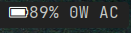
-
Unplugged and Discharging (No LED on port)
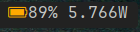
-
Charging (Red LED on port)

-
Left Click Module Display

- Calculates the weighted average of battery charge based on capacity (24Wh, or 72Wh)
- Displays charge status (charging, discharging, AC power) and current power consumption
- A single click opens a Rofi-based menu with detailed battery information
- Automatically detects and adjusts for battery swaps (e.g., switching between 24Wh and 72Wh)
acpi(to check battery status)rofi(for the clickable menu)Nerd FontsorAwesome Fonts(for icons)
- Copy the scripts to an accessible location, e.g.:
mkdir -p ~/.config/polybar
cp bat-status-bar.sh bat-dropdown-rofi.sh ~/.config/polybar/- Add the following to your Polybar configuration (
~/.config/polybar/config.ini):
[module/battery]
type = custom/script
exec = ~/.config/polybar/bat-status-bar.sh
click-left = ~/.config/polybar/bat-dropdown-rofi.sh
interval = 10- Update the Rofi theme in
bat-dropdown-rofi.shif necessary:
rofi -show run -theme ~/.config/polybar/batteries_rofi_style.rasiIf you prefer a custom theme, edit the corresponding .rasi file.
The Rofi theme is based on @adi1090x. If you prefer a custom theme, modify the batteries_rofi_style.rasi file!
Note: I don’t own the Rofi style configuration; it’s credited to @adi1090x, and credentials are included in the file.