ActionsManager is a multi-repository control plane for GitHub Actions workflows. It helps teams manage, synchronize, and review workflow changes across many repositories from one self-hosted interface.
Beta notice: ActionsManager Self-Hosted is currently a free beta preview for testing, evaluation, and feedback. No paid plans are currently available. The beta is self-hosted only; the hosted Cloud/SaaS and GitHub Marketplace paths are not part of this first public beta. Features, limits, licensing behavior, and commercial availability may change before general availability. The beta is provided as-is, without warranty, SLA, support guarantee, uptime guarantee, production-readiness guarantee, or enterprise/compliance/security guarantee.
Self-hosted operators are responsible for securing their deployment, protecting GitHub credentials and local environment files, backing up data, configuring least-privilege GitHub access, and reviewing workflow changes before applying, merging, or directly committing them. PR-based delivery is recommended for beta testing; direct commit mode should be used carefully.
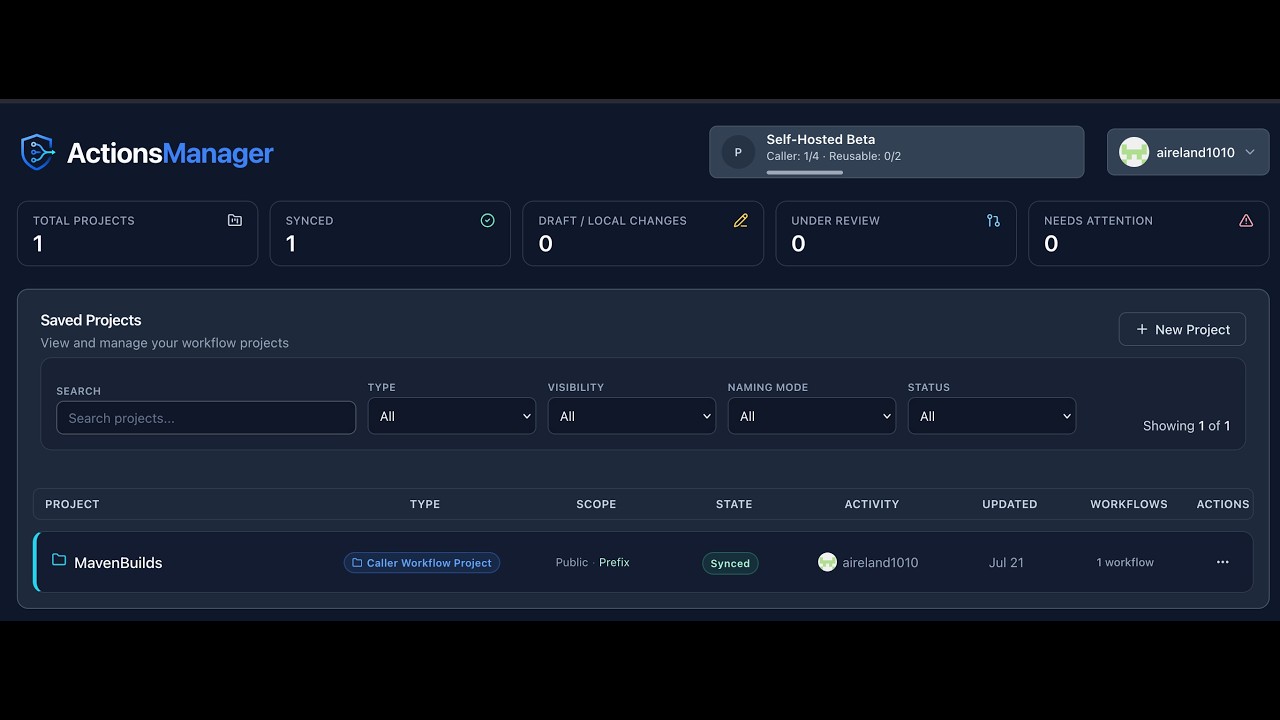
Watch a complete multi-repository workflow rollout end to end. What it covers: PAT authentication, creating the MavenBuilds project, adding three repositories, build-type detection, pull request creation, pull request management, and pull request merging.
→ Watch the full demo · → Read the demo walkthrough
Run ActionsManager as a single self-hosted container on port 8080. For the fastest evaluation path, sign in with a GitHub personal access token from the UI after the container starts.
Generate a stable secret key once and store it (use the same value on every restart):
openssl rand -hex 32docker run -d \
--name actions-manager \
-p 8080:8080 \
-v actions-manager-data:/app/data \
-e INSTALLATION_MODE=self-hosted \
-e SECRET_KEY=<your_generated_key> \
ghcr.io/dawg-io/actions-manager:latestThen open http://localhost:8080, choose Sign in with Personal Access Token, and paste a fine-grained or classic PAT. Do not put personal PATs in Docker command lines, shell history, screenshots, or committed environment files.
→ Documentation Site → Self-Hosted Installation Guide → Beta Notes → Privacy Notice → Security Policy
Cloud/SaaS, Marketplace billing, and paid licensing documents may remain in this repository for future planning or internal validation. They are not active offerings for the first public self-hosted beta.
After starting the container and opening http://localhost:8080, follow these steps for the first-time beta user happy path:
- Sign in with a PAT — choose Sign in with Personal Access Token and paste a fine-grained or classic GitHub PAT.
- Saved Projects dashboard — after login you land here. Click New Project.
- Create a Caller Workflow Project — enter a project name, choose Caller Workflow Project, and pick a color.
- Select repositories — choose public or private visibility, then select one or more repositories to manage.
- Review resource naming — keep Prefix Mode enabled unless you intentionally want unmanaged filenames. Review the summary and create the project.
- Project workspace — the empty workspace shows Import Existing, Create Pull Requests, and Add Workflow. Click Add Workflow.
- Choose workflow type — select Regular Workflow.
- Configure the workflow — enter a name and choose Open Blank Workflow, Detect Build Types, Generate Templates, or Generate with AI.
- Review the YAML editor — the editor shows the prefixed filename, selected repository, and Unsaved state.
- Save as a local draft — click Commit Locally, confirm in the modal.
- New Local status — the editor shows the New Local badge and a toast confirms the draft is saved.
- Create pull requests when ready — return to the workspace and click Create Pull Requests to propose the workflow to GitHub. PR-based delivery is recommended for beta testing.
Saving a draft does not push to GitHub. A saved draft exists only in ActionsManager until you create pull requests or use direct commit mode.
→ Full screenshot walkthrough →
| Permission | Level | Required for |
|---|---|---|
| Metadata | Read-only | All operations |
| Contents | Read and write | Workflow file management |
| Actions | Read and write | Workflow triggering |
| Pull requests | Read and write | PR-based delivery |
| Secrets | Read and write | Repository secrets management (optional) |
| Variables | Read and write | Repository variables management (optional) |
See GitHub PAT Setup for full token creation instructions.
ActionsManager is a control plane for GitHub Actions, designed for teams that need to manage workflows across many repositories rather than one at a time. Instead of editing YAML in each repo, you operate on a fleet:
- Manage workflows across repositories from a single interface, with project-based grouping for multi-repo operations
- Bulk operations to apply, update, or remove workflows across every repository in a project in one action
- Synchronize workflows at scale by treating reusable workflows as the source of truth and propagating changes to consumers
- Drift detection and resolution to surface when a repository's workflow has diverged from the managed definition
- PR orchestration to deliver changes through reviewable pull requests across many repositories at once, with optional direct-commit mode where appropriate
- Control workflow consistency by enforcing a known-good state for both reusable workflow definitions and the caller workflows that consume them
- Intelligent build detection that inspects repositories (Maven, Gradle, npm, .NET, Python, Go, Rust, etc.) and recommends matching workflow templates
- Secrets & variables management at repository and environment scope, including bulk deployment
- GitHub authentication options with GitHub OAuth plus fine-grained or classic personal access tokens
- Real-time collaboration via WebSockets so teams see updates as they happen
ActionsManager uses two project types:
Reusable Workflow Projects are producer projects. They define reusable workflows that can be shared across repositories.
Caller Workflow Projects are consumer projects. They manage the repositories and caller workflows that invoke reusable workflows using uses:.
| Project Type | Role | Description |
|---|---|---|
| Reusable Workflow Project | Producer | Authors and versions reusable workflow definitions that are shared across repositories |
| Caller Workflow Project | Consumer | Manages repositories whose workflows call reusable workflows |
Developer note: Internally, the API and database use the value
standardfor Caller Workflow Projects andrwxfor Reusable Workflow Projects. This is a legacy/internal convention for backward compatibility. The user interface and all user-facing documentation display these as Caller Workflow Project and Reusable Workflow Project respectively. No schema or API rename is planned.
ActionsManager manages both sides of GitHub Actions reusability — and the real value comes from managing them together.
- Reusable Workflows (Producers) — the centrally defined workflows (typically in a shared repository) that encode your organization's build, test, release, security, and deployment standards. ActionsManager lets you author and version these as the single source of truth.
- Caller Workflows (Consumers) — the per-repository workflows that invoke a reusable workflow via
uses:. ActionsManager generates, distributes, and keeps these in sync across every repository in a project, so consumers stay aligned with the producer they reference.
Most tools focus on one side or the other. Managing producers without their consumers leaves drift; managing consumers without a versioned producer leaves duplication. ActionsManager closes that loop: when a reusable workflow changes, the platform knows which caller workflows are affected and can deliver the update across the fleet.
ActionsManager is built around a few concrete primitives that make multi-repository management practical:
- Projects group multiple repositories under a single managed scope. A project is the unit you operate on — permissions, workflows, secrets, and rollouts are all coordinated at the project level.
- Workflows are applied across repos, not per-repo. When you define or update a workflow in a project, ActionsManager tracks every repository it should exist in and what state it should be in.
- Reusable workflows are centrally defined in a designated repository (the producer). They are versioned and treated as the canonical definition.
- Caller workflows consume them in each target repository. ActionsManager generates and maintains these caller files, keeping their
uses:reference and inputs aligned with the producer. - Drift detection ensures consistency by continuously comparing the workflow content in each repository against the managed definition, flagging any divergence (manual edits, missing files, outdated reusable references).
- PR-based delivery allows safe rollout — changes are proposed as pull requests across all impacted repositories, can be reviewed and merged independently or in bulk, and direct-commit mode is available when review overhead isn't needed.
The result: one place to change a workflow, one place to see who's out of sync, one place to roll the change out.
A typical end-to-end flow on ActionsManager looks like this:
- Update a reusable workflow in the producer repository (for example, bump the version of a shared build-and-publish workflow).
- Detect impacted repos — ActionsManager identifies every caller workflow across every project that consumes the updated reusable workflow.
- Create PRs across repos in a single bulk operation. Each affected repository receives a pull request updating its caller workflow to the new version, with consistent commit messages and metadata.
- Merge or sync the PRs individually, in bulk, or via direct commits where PR review isn't required.
- Resolve drift if needed — for any repository whose workflow was edited outside the platform, drift detection surfaces the divergence and provides a guided resolution to bring it back in line with the managed state.
This same flow covers rolling out a new workflow to a project, retiring an obsolete one, or enforcing a security/compliance change across an entire repository fleet.
- Group repositories into Projects as the unit of management
- Operate on entire fleets of repositories from a single interface
- Branch-specific workflow configurations supported per repository
- Apply, update, or remove workflows across every repository in a project in one action
- Bulk PR creation, bulk merging, and bulk synchronization
- Consistent commit messages, branch naming, and metadata across the fleet
- Treat reusable workflows as the source of truth and keep caller workflows aligned
- Enforce a known-good workflow state across all managed repositories
- Manage both reusable workflow definitions (producers) and caller workflows (consumers) together
- Continuous comparison of repository workflow state against the managed definition
- Surfaces manual edits, missing files, and outdated reusable workflow references
- Guided resolution to bring drifted repositories back into compliance
- PR mode: Reviewable pull requests across many repositories with audit trail
- Direct mode: Commit changes straight to target branches when review overhead isn't required
- Per-PR branch naming and best-effort branch cleanup after merge
- Visual workflow editor with syntax highlighting (Monaco)
- Template library for common CI/CD patterns
- First-class support for both reusable workflow definitions and caller workflows
Automatically detects and suggests workflows for:
- Java: Maven, Gradle, Ant
- Node.js: npm, Yarn
- C#/.NET: MSBuild, dotnet CLI
- Python: pip, Poetry, setuptools
- Go: go mod
- Rust: Cargo
- Docker: Dockerfile-based builds
- Secure creation and management of repository secrets
- Environment variable configuration
- Bulk secret deployment across repositories in a project
- GitHub OAuth and Personal Access Token authentication (see GitHub Authentication Options)
- Secure token management and API access
- Free during the beta period; no paid plans are currently available
- Self-hosted only for the first public beta
- Cloud/SaaS and GitHub Marketplace billing are future/planned paths, not active beta offerings
- Features, limits, and licensing behavior may change before general availability
The first public release is ActionsManager Self-Hosted Beta. It is free during beta, and no paid plans are currently available.
| Topic | Current beta status |
|---|---|
| Self-hosted | Available as a free beta preview |
| Cloud/SaaS | Not part of the first public beta |
| GitHub Marketplace billing | Not active for this beta |
| Paid plans | Not currently available |
| Future commercial licensing | May be introduced later; terms and limits may change before GA |
The application contains tier and license-key code paths used for development and future planning. During this beta, public documentation should not be read as a live paid-plan offer. Free beta access does not grant permanent free access to future paid features.
→ Commercial License Overview → License Key Notes
- Docker 20.10+ or Podman 3.0+ (with podman-compose)
- Linux or macOS operating system
- 4GB+ RAM for self-hosted beta
- 10GB+ disk space
- A GitHub account with repository access
- GitHub OAuth App (optional - only required if you want OAuth login)
Cloud/SaaS and GitHub Marketplace deployment materials are future/planning references and are not part of the first public self-hosted beta.
Note: Docker/Podman is the only supported installation method for end users. Local development setup (without containers) is for contributors only — see CONTRIBUTING.md and docs/DEVELOPMENT.md.
ActionsManager supports three GitHub credential types today:
- GitHub OAuth access token via the normal "Log in with GitHub" flow — fastest browser-based setup, best for individuals and small teams
- Fine-grained personal access token (recommended for self-hosted) — repository-scoped, doesn't require a GitHub OAuth App
- Classic personal access token — broader scope, supported for compatibility
Credential selection works like this: a saved PAT is used when configured, otherwise the current OAuth token is used, and a clear authentication error is returned when neither is available. Saved PATs are encrypted at rest and never returned to the UI in raw form.
→ GitHub PAT Setup — fine-grained/classic token creation, minimum permissions, troubleshooting → GitHub OAuth Setup — OAuth App creation and callback configuration
ActionsManager supports two deployment modes. See Deployment Modes Comparison for architecture diagrams and a full comparison, or INSTALLATION.md for the complete Docker run / Docker Compose walkthrough (SSL/TLS, backups, production hardening).
- Self-Hosted — the single-container image shown in Quick Start above, on port 8080.
- Cloud/SaaS (future, not part of this beta) — multi-container deployment with GitHub Marketplace billing and required PostgreSQL. Retained in this repository as a planning reference only. See Complete Cloud Deployment Guide.
- Quick Start Guide - Self-hosted beta quick start
- Product Demo - Full walkthrough video and written guide
- Self-Hosted Installation - Docker run and Docker compose setup
- Beta Notes - Beta scope, limitations, and user responsibilities
- Environment Variables - Complete reference for all configuration options
- GitHub PAT Setup - Fine-grained and classic PAT setup, permissions, and troubleshooting
- License Keys - Self-hosted license-key behavior and future tier notes
- Licensing Model - Community/Core and future commercial model notes
- Privacy Notice - Self-hosted beta privacy notice
- Security Policy - Vulnerability reporting and hardening guidance
- Deployment Modes - Architecture comparison and migration guide
- Database Schema - Table structure and relationships
- API Documentation - once the backend is running, visit
/docsfor interactive Swagger/OpenAPI docs. Disabled by default in production installs (ENVIRONMENT=production, the shipped default); setDISABLE_API_DOCS=falseto re-enable.
- Marketplace Integration - Future Cloud/SaaS planning reference; not active for the self-hosted beta
- CI/CD Pipeline - Automated testing and deployment workflow reference
- Pipeline Quick Reference - Local commands and troubleshooting
- CONTRIBUTING.md - Fork/branch/PR workflow, code review expectations
- docs/DEVELOPMENT.md - Backend/frontend local setup, testing, project structure
- docs/FRONTEND_DEVELOPMENT.md - Frontend stack, component patterns, testing
- docs/TROUBLESHOOTING.md and docs/troubleshooting/ - Installation, auth, backend/frontend, database, and Docker issues
- LICENSE_KEY_GUIDE.md - License key configuration and troubleshooting
- Check the Issues page for known problems
- Review the Build Detection documentation for build type detection details
- Examine application logs for detailed error messages
ActionsManager uses a dual licensing model:
- Community/Core source code is licensed under Apache License 2.0.
- Commercial Pro, Enterprise, self-hosted paid features, and cloud/SaaS access may be governed by separate commercial terms, EULA, or GitHub Marketplace subscription terms.
See:
These documents are product/legal drafts and should be reviewed by a qualified attorney before public launch.