
An offline app for learning ukulele — on Android and iOS
Chords, scales, music theory, composition tools, and more.
Built with Kotlin Multiplatform, Jetpack Compose, and SwiftUI.





|
Tap fret positions on a visual ukulele fretboard (standard GCEA tuning, frets 0–12) and the app instantly detects and displays the chord. Supports 19 chord types across triads, sevenths, suspended, and extended chords. Shows alternate notational symbols ("Also written as") so you can recognize chords written in different styles. Browse playable voicings for any chord. Select a root note, category (Triad, Seventh, Suspended, Extended), and chord type to see algorithmically generated voicings displayed as mini fretboard diagrams. Shift chords up or down by semitones with +/- buttons. Shows the capo equivalent for easy reference. The tuner now uses a hybrid pipeline: fast YIN pitch tracking on every frame, supervised by SwiftF0 neural inference at intervals. This improves robustness against octave mistakes and unstable frames while preserving responsive needle movement. A reference guide with 14 strumming and 10 fingerpicking patterns — from beginner to advanced — in 4/4, 3/4, and 6/8 time. Each pattern includes visual beat/step display, notation, description, and a play button with adjustable tempo so you can hear what each pattern sounds like. Create custom patterns with adjustable beat counts (2–16) and time signatures, or duplicate any preset to make your own variations. Common chord progressions for any key across seven modes (Major, Minor, Dorian, Phrygian, Lydian, Mixolydian, Locrian). Each chord chip shows its harmonic function (Tonic, Subdominant, Dominant) with colour coding. Includes Pop, Classic Rock, 50s, Folk, Jazz ii-V-I, Reggae, and more. Create custom progressions with diatonic chord suggestions from the selected scale, duplicate presets, copy to clipboard, and use tap tempo for practice. Highlight notes from any of 37 scales (Major, Natural/Harmonic/Melodic Minor, Pentatonic, Blues, modes, Bebop, Diminished, and more) directly on the fretboard. Filter by fret position and see the diatonic chords for each scale. |
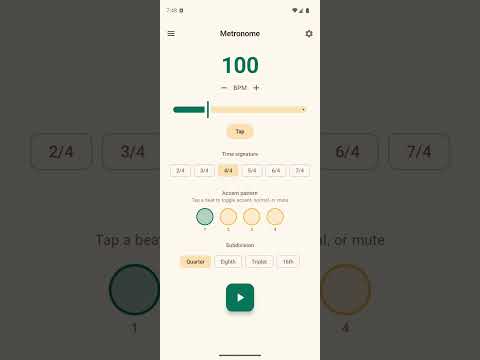
Long-press any voicing in the Chord Library to save it. Access your saved voicings from the dedicated Favorites tab. Create a personal songbook with lyrics and inline chord markers (e.g., A standalone practice metronome with adjustable BPM (30–300), tap tempo, time signatures (2/4 to 7/4), customizable accent patterns, and subdivisions (quarter, eighth, triplet, sixteenth). Visual beat indicators pulse in time. Compose melodies by tapping notes, recording from your ukulele's microphone, or using the step sequencer — a grid of 8 or 16 steps for building loops and rhythmic patterns. Choose note durations, set the octave, and play back at any tempo. Save and load multiple melodies. A guided "Start a Song" flow that walks you through picking a key and scale, building a chord progression from diatonic suggestions, writing lyrics with inline chords, transposing, and saving to your songbook — all in one place. Hear chords played back using sampled ukulele audio. Notes are strummed with a configurable delay between strings. Theory lessons, ear training, interval trainer, circle of fifths, glossary, scale practice, achievements, and more. |


Watch the feature guide playlist
- Display: Light/Dark/System/High Contrast theme, show/hide Learn and Reference sections
- Tuning: High-G (standard), Low-G, Baritone, D-Tuning, and more
- Fretboard: Left-handed mode (mirrors the fretboard)
- Sound: Enable/disable, volume, strum delay, note duration, play on tap
Ukulele Companion is designed to be usable by everyone, including blind and visually impaired musicians:
- TalkBack support (Android): All interactive elements have descriptive content descriptions for Android's screen reader
- VoiceOver support (iOS): All views include accessibility labels, traits, and hints for Apple's screen reader
- Heading semantics: Screen titles and section headers are marked as headings for efficient screen reader navigation
- Live regions: Dynamic content like tuner readings, chord detection, and pitch monitoring are announced by screen readers as they change
- Canvas alternatives: Visual-only components (tuner meter, chord diagrams, fretboard, pitch monitor, Circle of Fifths) have text descriptions for screen readers
- High contrast theme: A high-contrast color scheme is available in Display settings (Android and iOS)
- Logical focus order: Navigation follows a logical order for keyboard and switch access users
| Component | Android | iOS |
|---|---|---|
| Language | Kotlin 2.4 | Swift + Kotlin (via KMP) |
| UI | Jetpack Compose + Material 3 | SwiftUI |
| Architecture | ViewModel + StateFlow | ObservableObject + @Published |
| Shared Logic | Kotlin Multiplatform (:shared module) |
Same KMP module via framework |
| Audio | SoundPool with WAV samples | AVFoundation with WAV samples |
| Persistence | SharedPreferences + DataStore | UserDefaults |
| Serialization | Kotlinx Serialization | Codable + JSONSerialization |
| Neural Inference | ONNX Runtime Android | ONNX Runtime C API (xcframework) |
| Build | Gradle 9.5, AGP 9.2, Kotlin DSL | Xcode, min iOS 16.0 |
| Min SDK | 26 (Android 8.0) | iOS 16.0 |
| Target SDK | 35 | — |
| Localization | Android resources (16 locales) | Localizable.xcstrings (16 locales) |
ukulele-companion/
├── shared/                          # Kotlin Multiplatform shared module
│   └── src/
│       ├── commonMain/              # Domain + data logic (Kotlin)
│       │   ├── domain/              # ChordDetector, PitchDetector, Transpose, etc.
│       │   └── data/                # Notes, Scales, ChordFormulas, Progressions, etc.
│       ├── androidMain/             # Android platform actuals (UUID, Calendar)
│       └── iosMain/                 # iOS platform actuals (NSUUID, NSDate)
│
├── app/                             # Android app module
│   └── src/main/java/com/baijum/ukufretboard/
│       ├── audio/                   # SoundPool, metronome, audio capture
│       ├── data/                    # Repositories (SharedPreferences), backup/restore
│       ├── domain/                  # NeuralPitchSupervisor, AchievementChecker
│       ├── ui/                      # Compose screens and components
│       └── viewmodel/               # ViewModels (StateFlow)
│
├── iosApp/                          # iOS app (SwiftUI)
│   └── UkuleleCompanion/
│       ├── Views/                   # SwiftUI views
│       ├── ViewModels/              # ObservableObject ViewModels
│       ├── Audio/                   # AudioCaptureEngine, TonePlayer, NeuralPitchSupervisor
│       ├── Helpers/                 # Accessibility helpers, backup/restore manager
│       └── Resources/               # WAV samples, ONNX model
- Android: Android Studio (latest stable — Ladybug or newer), JDK 11+
- iOS: Xcode 16+, macOS
git clone https://github.com/baijum/ukulele-companion.git
cd ukulele-companion

# Android
./gradlew assembleDebug

# iOS (requires macOS)
cd iosApp && ./setup_onnxruntime.sh && cd ..
xcodebuild -project iosApp/UkuleleCompanion.xcodeproj \
  -scheme UkuleleCompanion \
  -destination 'platform=iOS Simulator,name=iPhone 16 Pro' \
  build
The Android debug APK will be at app/build/outputs/apk/debug/app-debug.apk.
Codebase map: For a complete table of all areas and sub-areas (features via NavSection, shared KMP domain/data, Android/iOS layers, cross-cutting concerns like accessibility/neural/backup, tests, and tooling), see CODEBASE_AREAS_SUBAREAS.md.
- Android: Open the project in Android Studio, select a device/emulator, and click Run (or press
Shift+F10). - iOS: Open
iosApp/UkuleleCompanion.xcodeprojin Xcode, select a simulator or device, and click Run (or pressCmd+R). The ONNX Runtime xcframework must be set up first viaiosApp/setup_onnxruntime.sh.
# Unit tests (including property-based fuzz tests)
./gradlew testDebugUnitTest

# Instrumented tests (requires emulator or device)
./gradlew connectedAndroidTest

# UI stress test with Android Monkey (requires emulator or device)
./scripts/monkey_test.sh            # 10,000 random events
./scripts/monkey_test.sh 42         # reproducible with seed
./scripts/monkey_test.sh 42 50000   # 50,000 events with seed
The project includes property-based tests using Kotest that generate thousands of random inputs to verify invariants in the domain logic (chord detection, transposition, FFT, pitch detection, and more). These run automatically as part of testDebugUnitTest and in CI on every push and PR.
scripts/ktlint.sh           # Kotlin style check (-F to auto-format)
scripts/preflight.sh        # one-shot gate: ktlint + shared tests + unit tests + lint
ktlint runs as a baseline ratchet — only violations beyond ktlint-baseline.xml fail, and
CI enforces it on Kotlin changes. Run scripts/preflight.sh before opening a PR.
Android:
- Create a
keystore.propertiesfile in the project root:
storeFile=path/to/your/keystore.jks
storePassword=your_store_password
keyAlias=your_key_alias
keyPassword=your_key_password- Build the release bundle:
./gradlew bundleReleaseThe AAB will be at app/build/outputs/bundle/release/app-release.aab.
Contributions are welcome! Whether you're fixing a bug, adding a feature, improving documentation, or refactoring code — we'd love your help.
Please read the Contributing Guide for detailed instructions on development setup, code guidelines, and the PR process. All participants are expected to follow our Code of Conduct.
- Fork the repository
- Create a branch for your feature or fix (
git checkout -b feature/my-feature) - Make your changes and test them
- Commit with a clear message (
git commit -m "Add: description of change") - Push to your fork (
git push origin feature/my-feature) - Open a Pull Request describing what you changed and why
We actively encourage contributors to use AI coding tools to accelerate their work on this project. The codebase is well-structured and AI-friendly:
- Use Cursor, GitHub Copilot, or similar AI tools to explore the codebase, understand patterns, and generate code that fits the existing architecture.
- Leverage AI for code reviews — before submitting a PR, ask an AI assistant to review your changes for consistency with the project's patterns.
- Use AI to write tests — expand the existing test suite with new unit tests, property-based fuzz tests, or UI tests.
- AI-powered documentation — use AI tools to help write clear commit messages, PR descriptions, and inline documentation.
- Built-in AI guardrails —
AGENTS.mdand.cursor/rules/carry the coding rules, and Claude Code hooks automatically block edits that violate the offline / no-analytics / no-secrets constraints. See How This Repo Supports AI Agents.
Tip: This project uses standard Kotlin + Jetpack Compose patterns on Android and SwiftUI on iOS, with shared domain logic via Kotlin Multiplatform. AI tools work exceptionally well with the codebase because it follows consistent conventions throughout.
- Shared module: Kotlin with official code style (Kotlin Multiplatform)
- Android UI: Jetpack Compose + Material 3 — no XML layouts
- iOS UI: SwiftUI
- Android state: ViewModel + StateFlow
- iOS state: ObservableObject + @Published
- Linting: Kotlin style enforced by ktlint via
scripts/ktlint.sh(baseline ratchet) - Follow existing patterns in the codebase — consistency is valued

- Shared module: Kotlin shared logic — chord detection, pitch detection, scales, notes, transposition, and all domain/data logic shared across platforms
- Android UI layer: Compose UI, single-activity architecture via
MainActivity - Android ViewModel layer: ViewModels managing state with
StateFlow - iOS UI layer: SwiftUI views with full feature parity
- iOS ViewModel layer: ObservableObject ViewModels
- Audio layer: Platform-specific audio capture, tone playback, and ONNX neural pitch detection
- Website: https://baijum.github.io/ukulele-companion/
- Privacy policy: https://baijum.github.io/ukulele-companion/privacy-policy/
Detailed feature documentation and a user manual are available in the docs/ directory:
- Design specs: Architecture and feature proposals in
docs/spec/ - User manual: Step-by-step guide in
docs/manual/
The Complete Ukulele Learning Book is a free PDF guide covering foundations, developing skills, mastery, and a songbook -- from first strums to jazz voicings and fingerstyle. Designed to pair with Ukulele Companion as a structured learning path.
Ukulele Companion is free on both platforms:
Ukulele Companion is free, offline, and ad-free -- and will stay that way. If it's helped you learn or play, consider buying me a coffee to support ongoing development:

Audio samples are from the "Ukelele single notes, close-mic" pack by stomachache on Freesound.org, licensed under CC BY 3.0. See ATTRIBUTION.md for full details.
This project is licensed under the MIT License.
Built with ❤️ for ukulele players everywhere
Star the repo if you find it useful — it helps others discover the project!