A web-based administration interface for managing Authelia authentication server with LLDAP.
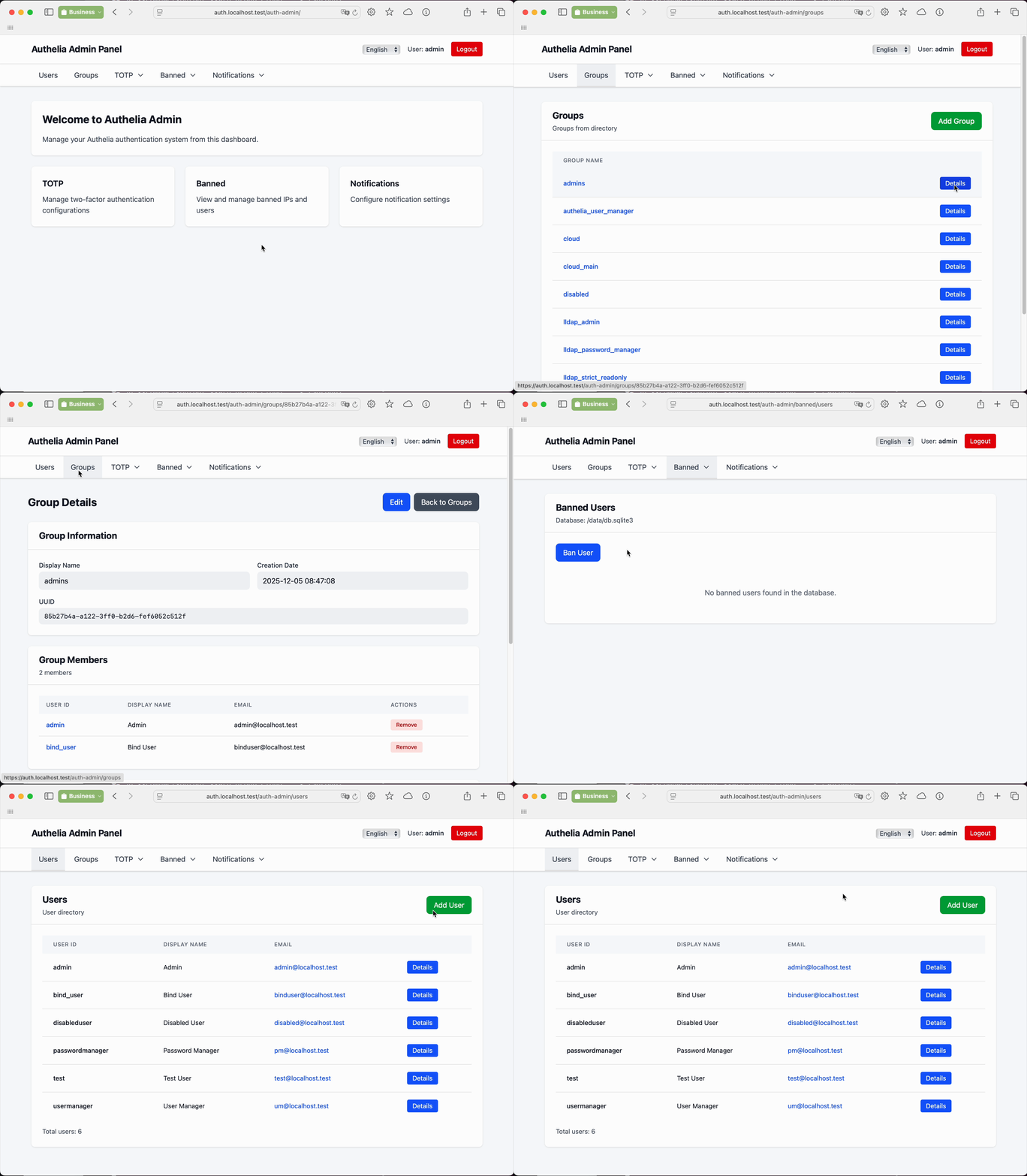
- Management of users and groups in LLDAP
- View and manage TOTP configurations
- View TOTP history
- Management of banned users and IPs
- Dedicated role for management of regular users (user_manager)
- Dedicated role for management of passwords of regular users (password_manager)
- Internationalization
- Ability to add another directory system
- Management of attributes of users and groups
- Browsing and management of users in Authelia file provider
- checkout the repository
/etc/hostsentries:127.0.0.1 localhost.test auth.localhost.test ldap.localhost.test- Run in the first termainl:
docker-compose -f docker-compose.test-pg.yml up - Run in the second terminal: sleep 5 && docker compose -f docker-compose.test-pg.yml exec -T lldap /bootstrap/bootstrap.sh
- Close the second terminal
- Open
https://auth.localhost.testand login, then go tohttps://auth.localhost.test/auth-admin
Configuration can be provided via YAML file or environment variables. Environment variables specific to the application use the AAD_ prefix and override YAML values.
Don't forget to configure your load balancer. Authelia Admin CP should be accessible at https://{{AAD_AUTHELIA_DOMAIN}}/auth-admin/.
Authelia Admin implements concept of protected users. Protected users are users which belong to the following groups: lldap_admin, lldap_password_manager, lldap_strict_readonly, authelia_user_manager. Only users with membership in lldap_admin can do anything with other protected users. Protected users are implemented to prevent access rights escalation.
Add your users of Authelia Admin in the following groups:
- lldap_password_manager - can list users, groups and change password of not protected users
- authelia_user_manager - lldap_password_manager access rights + can create, edit and delete users, can change memeberhip and password of non protected users
- lldap_admin - full access rights
You need to specify only the following environment variables for a minimal instance:
AAD_AUTHELIA_DOMAIN- Domain of Authelia server for authentication of requests, e.g.,auth.yourdomain.comTRUSTED_ORIGINS- Trusted origins for CSRF protection, e.g.,https://auth.yourdomain.com
| Variable | Description | Default |
|---|---|---|
PORT |
Server port | 9093 |
HOST |
Server host | 0.0.0.0 |
AAD_CONFIG_PATH |
Path to config.yml | /opt/authelia-admin/config.yml |
AAD_LOGLEVEL |
Logging level | WARN |
| Variable | Description | Default |
|---|---|---|
AAD_AUTHELIA_DOMAIN |
Authelia domain for authentication | auth.localhost.test |
AAD_AUTHELIA_CONFIG_PATH |
Path to Authelia's configuration.yml |
/config/configuration.yml |
AAD_AUTHELIA_COOKIE_NAME |
Session cookie name | authelia_session |
AAD_AUTHELIA_MIN_AUTH_LEVEL |
Minimum auth level (1=password, 2=2FA) | 2 |
AAD_AUTHELIA_ALLOWED_USERS |
Comma-separated list of allowed users | (empty = all users) |
| Variable | Description | Default |
|---|---|---|
AAD_DIRECTORY_TYPE |
Directory service type | lldap-graphql |
AAD_DIRECTORY_LLDAP_GRAPHQL_ENDPOINT |
LLDAP GraphQL API endpoint | http://lldap:17170/api/graphql |
AAD_DIRECTORY_LLDAP_GRAPHQL_USER |
LLDAP admin username | admin |
AAD_DIRECTORY_LLDAP_GRAPHQL_PASSWORD |
LLDAP admin password | (required) |
AAD_DIRECTORY_LLDAP_GRAPHQL_LDAP_HOST |
LDAP host for password changes | lldap |
AAD_DIRECTORY_LLDAP_GRAPHQL_LDAP_PORT |
LDAP port for password changes | 3890 |
AAD_DIRECTORY_LLDAP_GRAPHQL_LDAP_BASE_DN |
LDAP base DN for user operations | (required for password changes) |
| Variable | Description | Default |
|---|---|---|
TRUSTED_ORIGINS |
CSRF trusted origins | (required for production) |
NODE_TLS_REJECT_UNAUTHORIZED |
Set to 0 for self-signed certificates |
(not set) |
Example of config.yml for authelia-admin:
# Logging level (DEBUG, INFO, WARN, ERROR). Default: WARN
# Can be overridden by AAD_LOGLEVEL environment variable
logging_level: WARN

authelia:
  # Domain where Authelia is accessible
  domain: auth.localhost.test
  # Name of the session cookie used by Authelia
  cookie_name: authelia_session
  # Minimum authentication level required (1=password, 2=2FA)
  min_auth_level: 2
  # Optional: List of allowed users (if not set, all authenticated users are allowed)
  # allowed_users:
  #   - admin
  #   - user2

# Directory service configuration
directory:
  # Type of directory service (currently only lldap-graphql is supported)
  type: lldap-graphql
  # Configuration for LLDAP GraphQL backend
  lldap-graphql:
    endpoint: http://lldap:17170/api/graphql
    user: admin
    password: admin1234
    ldap_host: lldap
    ldap_port: 3890
    # LDAP base DN (required for password changes)
ldap_base_dn: dc=example,dc=comThe application runs on port 9093 and expects the Authelia database to be mounted.
docker run -p 9093:9093 \
  -v /path/to/authelia/config:/config \
  -v /path/to/authelia/data:/data \
  -v /path/to/authelia-admin/config.yml:/opt/authelia-admin/config.yml:ro \
  -e AAD_LOGLEVEL=DEBUG \
  -e TRUSTED_ORIGINS=https://auth.yourdomain.com \
  ghcr.io/asalimonov/authelia-admin:latest
Alternatively, using environment variables instead of a config file:
docker run -p 9093:9093 \
  -v /path/to/authelia/config:/config \
  -v /path/to/authelia/data:/data \
  -e AAD_LOGLEVEL=DEBUG \
  -e AAD_AUTHELIA_DOMAIN=auth.yourdomain.com \
  -e AAD_DIRECTORY_LLDAP_GRAPHQL_ENDPOINT=http://lldap:17170/api/graphql \
  -e AAD_DIRECTORY_LLDAP_GRAPHQL_USER=admin \
  -e AAD_DIRECTORY_LLDAP_GRAPHQL_PASSWORD=secret \
  -e TRUSTED_ORIGINS=https://auth.yourdomain.com \
ghcr.io/asalimonov/authelia-admin:latestNote: When deploying with a reverse proxy, ensure the
TRUSTED_ORIGINSmatches your domain for CSRF protection.
See docker-compose.yml for a complete example with Authelia, LLDAP, and Traefik.
# Install dependencies and build docker image
make build-dev

# Run Authelia, LLDAP, and Traefik via Docker Compose
make run-docker-compose

# In a second terminal, run Docker with authelia-admin with hot-reload
make run-dev
Use admin user with admin1234 password. The confirmation code can be found in the ./test-data/authelia/notification.txt file.
/etc/hostsentries:127.0.0.1 localhost.test auth.localhost.test ldap.localhost.test- Docker and Docker Compose installed
- Production image built with
make build - Chromium installed:
npx playwright install chromium
Run Playwright UI - npx playwright test --config=e2e/playwright.config.ts --ui --project=chromium
- Node.js 22+
- Access to Authelia's configuration file
- Access to Authelia's SQLite database
- Access to GraphQL and LDAP interfaces of LLDAP