Real-time audio metering for any sound playing on your machine — no routing, no plugin slots required. Free & open source.


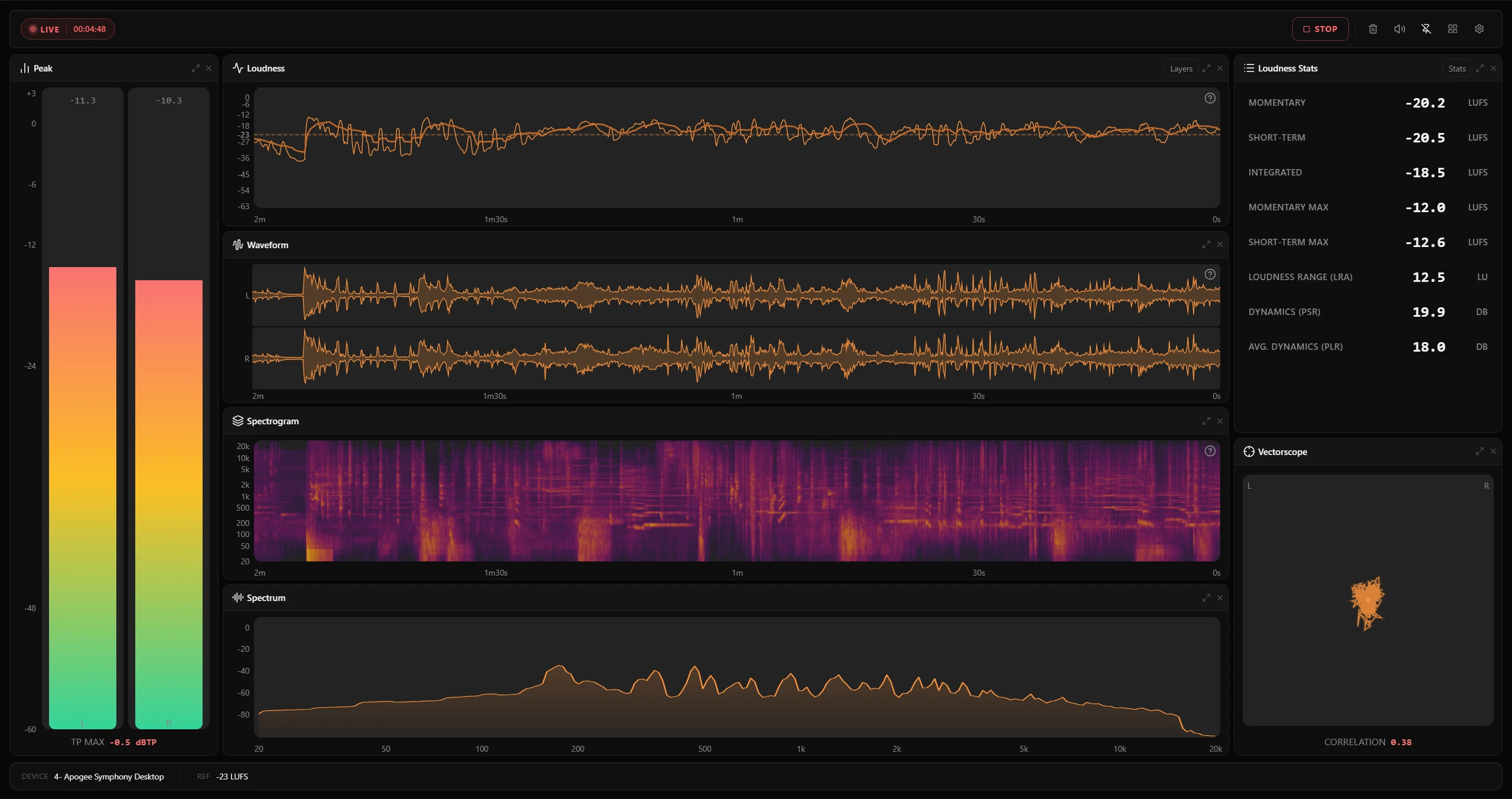
PLVS (reads as "plus") is a read-only, real-time audio meter built for sound designers and mix engineers. It watches audio playing on your machine — no DAW routing, no virtual cables, no plugin slots required.
It combines six meter types in a single desktop app:
| Meter | What it shows |
|---|---|
| Peak | Per-channel sample-peak meters (dBFS) |
| Loudness | LUFS — Momentary, Short-term, Integrated, LRA (ITU-R BS.1770, EBU R128), plus optional dialogue-gated readouts |
| Spectrum | FFT-based real-time analyzer with per-band dBFS |
| Spectrogram | Scrolling time-frequency waterfall |
| Vectorscope | Stereo phase / correlation with configurable channel pairs |
| Waveform | Per-channel DAW-style amplitude envelope over the session history |
PLVS does not process, route, or modify audio. It's a monitor — it watches your signal and gets out of the way.
- No routing required — monitors any audio playing on your machine. Windows uses WASAPI loopback; macOS uses the native audio tap.
- Multichannel — auto-detects mono, stereo, 5.1, and 7.1 with proper per-channel metering and BS.1770 weighting.
- Session history & snapshots — scroll back through the loudness timeline. Click any moment to freeze all meters at that snapshot, then return to live with one click.
- Configurable loudness reference — set a target LUFS value overlaid on the loudness chart.
- Dialogue-gated loudness (optional) — speech-aware readouts that measure loudness only over detected dialogue: Coverage (how much of the program is speech), Integrated, Range (LRA), and Offset (how far dialogue sits above or below the overall mix), with a live "speaking now" indicator. Powered by an on-device Silero VAD; enable it by adding any dialogue readout to the loudness stats. A real-time monitoring estimate, not a certified dialogue measurement.
- Flexible layout — drag dividers, resize panels, switch between built-in presets. Multiple themes included.
- Privacy-first — audio stays on device. No telemetry, no accounts, no network calls except update checks.
- ASIO is not supported on Windows. ASIO drivers bypass the Windows audio mixer entirely, so WASAPI loopback capture cannot intercept the signal. If you are using a DAW (e.g. REAPER, Ableton Live), set the DAW's audio system to WASAPI to allow PLVS to capture its output. For setups that require ASIO, routing through a virtual audio cable (e.g. VB-Cable) to a WASAPI-visible device is a workable alternative.
- Dialogue-gated readouts are an estimate, not a certified measurement. Dialogue detection uses the open-source Silero VAD rather than the proprietary Dolby Dialogue Intelligence used by certified broadcast tools, so the dialogue values can differ from those tools by a small margin. It also detects voice activity in general — singing is counted as speech — so the readings run high on music with prominent vocals. Use it for monitoring, not for compliance sign-off.
Tip
Visit GitHub Releases for the latest version.
| Platform | Package | Notes |
|---|---|---|
| Windows 10/11 (x64) | PLVS_x64-setup.exe |
NSIS installer |
| Windows 10/11 (x64) | PLVS_portable_x64.exe |
Portable — no install required |
| macOS (Apple Silicon) | PLVS_aarch64.dmg |
Requires macOS 14.2+ for system audio capture |
macOS — first launch warning
PLVS is not notarized by Apple. If macOS blocks the app on first launch, run:
xattr -cr /Applications/PLVS.appAlternatively, move PLVS.app to the Trash and immediately move it back — this also clears the quarantine flag.
Windows — SmartScreen warning
The installer is not code-signed. If SmartScreen blocks it, click More info → Run anyway.
- Download the installer for your platform from Releases.
- Launch PLVS and select your audio source from the toolbar dropdown:
- System Output (default) — monitors whatever is playing on your machine.
- Input device — monitors a physical microphone or line input.
- Press Start to begin monitoring.
- Arrange panels by dragging dividers and choosing a layout preset from the toolbar.
- Click any point on the loudness history chart to freeze a snapshot across all meters.
Requires Node.js ≥ 20.19.0 and Tauri v2 prerequisites (Rust, platform build tools).
git clone https://github.com/SounDoer/PLVS.git
cd PLVS
npm install
npm run desktop # start dev build with hot reloadnpm test # unit tests (Vitest)
npm run lint # ESLint
npm run build # build frontend to dist/
npm run desktop:build # full Tauri release build
npm run desktop:release-nsis # Windows NSIS installer
npm run desktop:release-dmg # macOS DMG
npm run check # full pre-merge check (format + lint + test + build)
npm run rust:check # Rust: fmt + clippy + test| Layer | Technology |
|---|---|
| Desktop shell | Tauri v2 (Rust) |
| Frontend | React 19 + Vite |
| Styling | Tailwind CSS v4 |
| UI primitives | Radix UI + shadcn/ui patterns |
| Charts & canvas | Custom Canvas 2D rendering pipeline |
| Audio capture | WASAPI loopback (Windows) / native audio tap (macOS) |
| DSP | Custom Rust pipeline — FFT, LUFS, peak, correlation |
| Testing | Vitest (frontend), cargo test (Rust) |
- Product Requirements (PRD) — what PLVS is, who it's for, product boundaries.
- Architecture — tech stack, directory map, audio pipeline, IPC, theme system.
- Design Tokens — CSS variable system and theme structure.
- Loudness References — platform delivery targets for loudness overlays.
- ADR — architecture decision records.
Contributions are welcome. Before submitting a PR, please read CONTRIBUTING.md for environment setup, code conventions, and CI expectations.
- All code comments and docstrings should be in English.
- The full pre-merge check is
npm run check. - See
docs/README.mdfor a documentation map.
PLVS stands on the shoulders of excellent open-source work. In particular:
- Silero VAD — the voice activity detection model used for dialogue-gated loudness. The model is bundled via the
voice_activity_detectorcrate (MIT). - CPAL — cross-platform audio capture (Apache-2.0).
- RustFFT & RealFFT — the FFT engine behind the spectrum and spectrogram (MIT / Apache-2.0).
- Rubato — sample-rate conversion (MIT).
- Tauri — the desktop application framework (MIT / Apache-2.0).
Thanks to all the maintainers and contributors of these projects.