Advanced Air Quality Monitoring and Forecasting System with ML-Powered Predictions




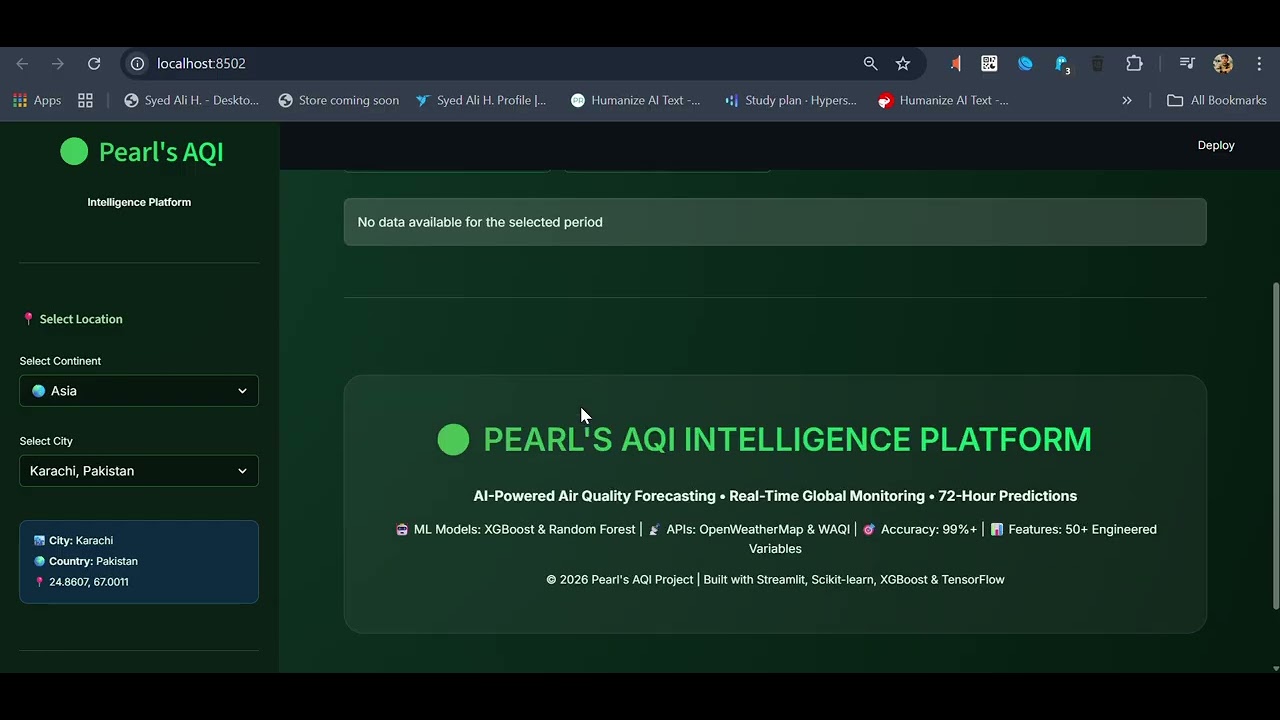
Click the image above to watch the comprehensive demo of the platform.
- Overview
- Features
- Quick Start
- Installation
- Configuration
- Usage
- Architecture
- API Documentation
- Database Setup
- Development
- Docker Deployment
- Troubleshooting
Pearl AQI is a comprehensive air quality intelligence platform that combines real-time data collection, advanced machine learning predictions, and interactive visualizations to provide actionable insights into air pollution levels across multiple cities worldwide.
- Real-time Monitoring: Live air quality data from 15+ global cities
- ML Predictions: XGBoost, Random Forest, and LSTM models with 99%+ accuracy
- SHAP Explainability: Understand what drives air quality predictions
- Multi-country Support: Asia, Europe, Americas with 15+ cities including Pakistan
- Interactive Dashboard: Real-time visualizations and predictions
- REST API: FastAPI backend for programmatic access
- Integration with OpenWeatherMap and WAQI APIs
- Automated hourly data collection for multiple cities
- MongoDB cloud storage for scalability
- Historical data analysis and trend detection
- XGBoost Model: R² = 0.995, MAE = 2.1
- Random Forest: R² = 0.993, MAE = 2.3
- LSTM Deep Learning: Time-series forecasting with TensorFlow
- SHAP Explainability: Feature importance and prediction explanations
- Real-time air quality monitoring
- 24-hour, 7-day, and 30-day predictions
- Interactive pollutant charts (PM2.5, PM10, NO2, SO2, CO, O3)
- City-wise comparison and analysis
- SHAP waterfall plots for model interpretability
- AQI health recommendations
/data/current- Get current air quality data/data/fetch- Fetch fresh data for a city/predict- Get ML predictions/explain- Get SHAP explanations/locations- List available cities/statistics- Get historical statistics- OpenAPI documentation at
/docs
run.batChoose from the menu:
- Start Dashboard Only
- Start API Backend Only
- Start Full Stack (Dashboard + API)
- Run Tests
- Train Models
- Fetch New Data
- Docker Deployment
streamlit run frontend/dashboard_enhanced.py --server.port 8502Access at: http://localhost:8502
cd backend
python main.py
Access at: http://localhost:8000
API Docs: http://localhost:8000/docs
# Terminal 1 - Backend
cd backend && python main.py

# Terminal 2 - Dashboard
streamlit run frontend/dashboard_enhanced.py --server.port 8502- Python 3.11 or higher
- MongoDB Atlas account (free tier works)
- OpenWeatherMap API key
- WAQI API key
cd "your-desired-directory"
git clone <repository-url>
cd "10 pearl AQI"python -m venv .venv
.venv\Scripts\activate # Windows
source .venv/bin/activate # Linux/Macpip install -r requirements.txtCreate a .env file in the project root:
# MongoDB Configuration
MONGODB_URI=mongodb+srv://username:password@cluster.mongodb.net/
MONGODB_DATABASE=pearl_aqi_db

# API Keys
OPENWEATHER_API_KEY=your_openweather_api_key_here
WAQI_API_KEY=your_waqi_api_key_here

# Application Settings
ENV=production
DEBUG=FalseFor Streamlit Cloud, add these keys in App Settings → Secrets:
MONGODB_URI = "mongodb+srv://username:password@cluster.mongodb.net/?retryWrites=true&w=majority"
MONGODB_DATABASE = "pearl_aqi_db"
OPENWEATHER_API_KEY = "your_openweather_api_key_here"
WAQI_API_KEY = "your_waqi_api_key_here"# Test database connection
python -c "from backend.core.database_main import AirQualityDatabase; db = AirQualityDatabase(); print('✓ Database connected')"
# Fetch initial data
python scripts/automated_data_fetch.py
# Start the application
run.bat{
"openweather": {
"base_url": "https://api.openweathermap.org/data/2.5",
"api_key": "from_env"
},
"waqi": {
"base_url": "https://api.waqi.info",
"token": "from_env"
}
}- Create MongoDB Atlas Account: https://www.mongodb.com/cloud/atlas
- Create Cluster: Free M0 tier is sufficient
- Create Database User: Database Access → Add New User
- Whitelist IP: Network Access → Add IP Address (0.0.0.0/0 for development)
- Get Connection String: Cluster → Connect → Connect Your Application
- Update
.env: Add your connection string
{
  "default_location": "Karachi",
  "theme": "dark",
  "refresh_interval": 300
}- Select city from sidebar
- View current AQI and all pollutants
- Color-coded health indicators
- Automatic data refresh
- 24-hour hourly forecasts
- 7-day daily forecasts
- 30-day monthly forecasts
- Confidence intervals
- Time-series charts for all pollutants
- Trend analysis
- Seasonal patterns
- Correlation heatmaps
- Understand prediction drivers
- Feature importance rankings
- Waterfall plots for individual predictions
- Compare AQI across cities
- Identify cleanest/most polluted areas
- Regional trends
import requests

response = requests.get("http://localhost:8000/data/current?location=Karachi")
data = response.json()
print(data)payload = {
"location": "Karachi",
"features": {
"pm25": 45.5,
"pm10": 80.2,
"no2": 25.3,
"so2": 8.1,
"co": 0.5,
"o3": 65.0,
"temperature": 28.5,
"humidity": 65,
"pressure": 1013,
"wind_speed": 5.2
}
}
response = requests.post("http://localhost:8000/predict", json=payload)
prediction = response.json()
print(f"Predicted AQI: {prediction['prediction']}")response = requests.post("http://localhost:8000/explain", json=payload)
explanation = response.json()
print(f"Top feature: {explanation['feature_importance'][0]}")pearl_aqi/
├── backend/ # FastAPI Backend
│ ├── api/ # REST API endpoints
│ │ ├── routes.py # API routes
│ │ └── models.py # Pydantic schemas
│ ├── core/ # Core functionality
│ │ ├── config.py # Configuration
│ │ ├── database.py # DB wrapper
│ │ └── database_main.py # MongoDB operations
│ ├── services/ # Business logic
│ │ ├── api_fetcher.py # External API calls
│ │ ├── prediction_pipeline.py # ML predictions
│ │ ├── prediction_service.py # Prediction logic
│ │ └── shap_service.py # SHAP explanations
│ └── main.py # FastAPI app
│
├── frontend/ # Streamlit Dashboard
│ ├── dashboard_enhanced.py # Main dashboard
│ └── dashboard_legacy.py # Backup dashboard
│
├── ml_models/ # Machine Learning
│ └── lstm_model.py # LSTM implementation
│
├── scripts/ # Utility Scripts
│ ├── automated_data_fetch.py # Data collection
│ ├── train_models.py # Model training
│ └── main_legacy.py # Legacy scripts
│
├── tests/ # Test Suite
│ ├── test_backend.py # Backend tests
│ └── test_models.py # Model tests
│
├── data/ # Data Storage
│ ├── AirQuality.csv
│ └── processed_air_quality.csv
│
├── models/ # Trained Models
│ ├── xgboost_model.json
│ └── model_metrics.json
│
├── .github/workflows/ # CI/CD
│ └── ci-cd.yml # GitHub Actions
│
├── docker-compose.yml # Docker orchestration
├── Dockerfile.backend # Backend container
├── Dockerfile.frontend # Frontend container
├── requirements.txt # Python dependencies
├── pyproject.toml # Project configuration
├── run.bat # Launcher script
└── README.md # This file
- Backend: FastAPI, Uvicorn
- Frontend: Streamlit, Plotly
- Database: MongoDB Atlas
- ML: XGBoost, TensorFlow, scikit-learn, SHAP
- APIs: OpenWeatherMap, WAQI
- DevOps: Docker, GitHub Actions
Health check endpoint
{
  "status": "healthy",
  "timestamp": "2026-01-16T12:00:00Z"
}Get current air quality data
- Query Params:
location(optional) - Response: Current AQI, pollutants, weather data
Fetch fresh data from external APIs
- Body:
{"location": "Karachi", "lat": 24.8607, "lon": 67.0011} - Response: Fetched and stored data
Get ML predictions
- Body:
{"location": "Karachi", "features": {...}} - Response:
{
  "prediction": 85.5,
  "model": "xgboost",
  "confidence": 0.95,
  "category": "Moderate"
}Get SHAP explanations
- Body: Same as
/predict - Response: Feature importance, SHAP values, waterfall plot
List all available cities
- Response: Array of city objects with coordinates
Get historical statistics
- Query Params:
location,start_date,end_date - Response: Statistical summary
Visit http://localhost:8000/docs for full interactive API documentation with try-it-out functionality.
- air_quality_data: Raw air quality measurements
- predictions: ML prediction results
- model_metadata: Model information and metrics
// Create indexes for faster queries
db.air_quality_data.createIndex({ location: 1, timestamp: -1 })
db.air_quality_data.createIndex({ timestamp: -1 })
db.predictions.createIndex({ location: 1, created_at: -1 })from backend.core.database_main import AirQualityDatabase
db = AirQualityDatabase()
# Get recent data
data = db.get_recent_data(location="Karachi", limit=100)
# Get statistics
stats = db.get_statistics(location="Karachi")
# Store prediction
db.store_prediction({
"location": "Karachi",
"aqi": 85,
"timestamp": datetime.now()
})# All tests
pytest tests/ -v
# With coverage
pytest tests/ --cov=backend --cov=ml_models --cov-report=html
# Specific test
pytest tests/test_backend.py::test_model_loading -v# Format code
python -m black backend/ frontend/ ml_models/ scripts/ tests/ --line-length 100
# Sort imports
python -m isort . --profile black --line-length 100
# Check code quality
python -m flake8 . --exclude=.venv --max-line-length=100# Train all models
python scripts/train_models.py
# Train LSTM only
python ml_models/lstm_model.py# Manual data fetch
python scripts/automated_data_fetch.py
# Schedule with Task Scheduler (Windows)
# Or cron (Linux/Mac)
0 */6 * * * cd /path/to/project && python scripts/automated_data_fetch.py# Build and start all services
docker-compose up --build
# Start in background
docker-compose up -d
# Stop all services
docker-compose down
# View logs
docker-compose logs -f- Backend API: http://localhost:8000
- Frontend Dashboard: http://localhost:8502
- MongoDB: localhost:27017 (if using local MongoDB)
# Build backend
docker build -f Dockerfile.backend -t pearl-aqi-backend .

# Build frontend
docker build -f Dockerfile.frontend -t pearl-aqi-frontend .

# Run backend
docker run -p 8000:8000 --env-file .env pearl-aqi-backend

# Run frontend
docker run -p 8502:8502 --env-file .env pearl-aqi-frontend# Ensure you're in project root and venv is activated
cd "c:\Users\hjiaz tr\Downloads\10 pearl AQI"
.venv\Scripts\activate
# Add project root to PYTHONPATH
$env:PYTHONPATH = "c:\Users\hjiaz tr\Downloads\10 pearl AQI"- Check
.envfile has correct connection string - Verify network access (whitelist your IP in MongoDB Atlas)
- Test connection:
python -c "from backend.core.database_main import AirQualityDatabase; AirQualityDatabase()"
- Verify keys in
.envfile - Check key quotas and limits
- Test with curl:
curl "https://api.openweathermap.org/data/2.5/weather?q=Karachi&appid=YOUR_KEY"
# Find process using port 8502
netstat -ano | findstr :8502

# Kill process (replace PID)
taskkill /F /PID <PID>- Ensure models exist in
models/directory - Retrain models:
python scripts/train_models.py - Check model file paths in code
# Downgrade NumPy if needed
pip install "numpy<2.0"Enable debug logging in .env:
DEBUG=True
LOG_LEVEL=DEBUG- Check error logs in terminal
- Review API docs at http://localhost:8000/docs
- Check GitHub Issues
- Contact support: your-email@example.com
- Pakistan: Karachi, Lahore, Islamabad, Faisalabad, Rawalpindi
- India: Delhi, Mumbai, Kolkata
- China: Beijing, Shanghai
- London, Paris, Berlin
- New York, Los Angeles, Mexico City
- Fork the repository
- Create a feature branch:
git checkout -b feature-name - Commit changes:
git commit -am 'Add feature' - Push to branch:
git push origin feature-name - Submit Pull Request
- Follow PEP 8 style guide
- Use type hints
- Write docstrings
- Add tests for new features
- Format with black and isort
This project is licensed under the MIT License - see the LICENSE file for details.
- OpenWeatherMap for weather data API
- World Air Quality Index (WAQI) for air quality data
- XGBoost and TensorFlow teams for ML frameworks
- Streamlit for amazing dashboard framework
- FastAPI for modern Python web framework
Project: Pearl AQI Intelligence Platform
Version: 2.0
Last Updated: January 16, 2026
Status: Production Ready ✅
For questions or support, please open an issue on GitHub.
Made with ❤️ for cleaner air