

KRAB (Knowledge & Relational Adversary Brain) is a robust, modular, Obsidian-based threat intelligence platform. It is engineered to bridge the gap between raw MITRE ATT&CK data and internal operational intelligence, providing real-time, bi-directional correlation between Threat Actors, Campaigns, Malware, Vulnerabilities, and TTPs.
Managing 600+ TTPs is overwhelming without proper context. KRAB solves this by turning your notes into a Graph Database. By using lightweight correlation automation, KRAB allows you to visualize exactly which techniques are being "operationalized" by specific adversaries, enabling you to move from theoretical risk to evidence-based threat hunting.
- Automated Bi-directional Correlation: A custom Templater-based engine that silently embeds metadata markers and intelligence tracking lines into your MITRE notes.
- Operational Intelligence Matrix: Dynamic, real-time dashboards that calculate the "total reuse" of TTPs across your entire data set.
- Vulnerability Mapping: Connects high-CVSS vulnerabilities directly to the TTPs used by the threat actors exploiting them.
- Intelligent Gap Analysis: Built-in alerts for "Cold Intelligence"—data you have scraped but haven't yet mapped to active threats.
- Detection Engineering Support: Automatically identifies techniques with "High" detection difficulty and "Low" current coverage, focusing your engineering efforts where they matter most.
- Plugins: Ensure the Dataview and Templater community plugins are enabled.
- Folder Structure: Create the following directory structure:
01_Threat_Actor/02_TTPs/03_Campaigns/04_Malware/05_Vulnerabilities/07_Collections/
- Template Ingestion: Copy the
KRAB Correlation Enginescript into your Obsidian Templater folder and assign it to a convenient hotkey or add it to your command palette.
The workflow is designed to be frictionless:
- Intelligence Collection: Create a note for a new Threat Actor, Campaign, or Malware family.
- Linking: Use standard wikilinks to reference TTPs, e.g.,
[[T1190 - Exploit Public-Facing Application]]. - Correlation Engine: Run the KRAB Correlation Engine script.
- Result: The engine scans your note, opens the target TTP notes in the background, and injects a clean
🔗 KRAB Intelligence Correlationsection at the bottom of the TTP note. - Meta-Data: It adds an inline key (e.g.,
[related_actor:: [[ActorName]]]) which your dashboard uses for its calculations.
- Result: The engine scans your note, opens the target TTP notes in the background, and injects a clean
The dashboard relies on Dataview to aggregate your findings. Once you run the correlation script, your Prevalence Matrix on the dashboard updates instantly to show the most "popular" techniques among your tracked adversaries.
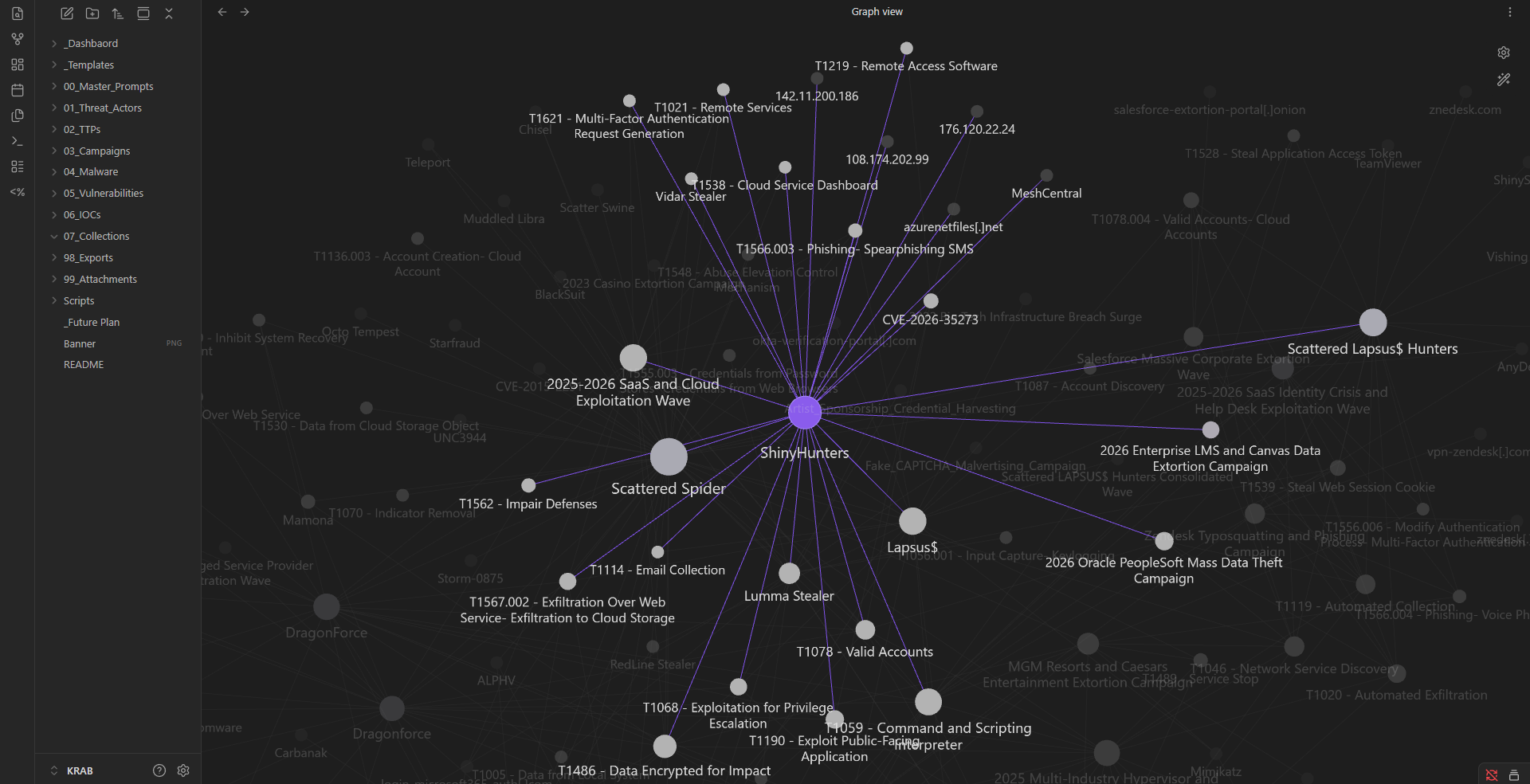
The KRAB dashboard is segmented into tactical and strategic views:
- Threat Landscape: High-level attribution and activity tracking.
- ATT&CK Prevalence Matrix: A dynamic table calculating the total count of TTP reuse across different domains.
- Exploitation Intelligence: Maps vulnerabilities (CVEs) to the TTPs and actors that utilize them.
- Detection & Hunting: Focused operational views highlighting "Detection Blindspots" and "Hunt Opportunities."
Project KRAB is built to evolve with your threat landscape.
- Upcoming features: Graph visualization enhancements, API integration for live threat feeds, and automated scoring of "Risk Profiles" for specific TTPs.
- Feedback: Contributions to the workflow or new query ideas for the dashboard are highly encouraged.
Built for the proactive threat hunter. Centralize your intelligence, optimize your defenses, and master the threat landscape.