I tried running different flags through an elevated CMD but it doesn't print anything.
Steps to Reproduce:
- I renamed
timerset_windows_v0.3.0.exe to timerset.exe
- run CMD as administrator
- Then go to the directory where the
timerset.exe is. `cd "C:\Users\BLANK\Downloads\Programs"
- Then type,
timerset.exe --install --islc
- Try different flags,
timerset.exe --help, timerset.exe -h, timerset.exe --values, timerset.exe -v, etc...
Expected behaviour:
Should display/prints values and other information. Also, timerset.exe should be seen in the Task Manger under details.
Actual behavior:
Doesn't do anything. It doesn't print any information. If you tried timerset.exe --install, it doesn't run or being registered in Task Manager processes under details tab.
Environment
- timertool-rs version: timerset_windows_v0.3.0.exe
- Operating System and version: Windows 10 2004 (OS Build 19041.685)
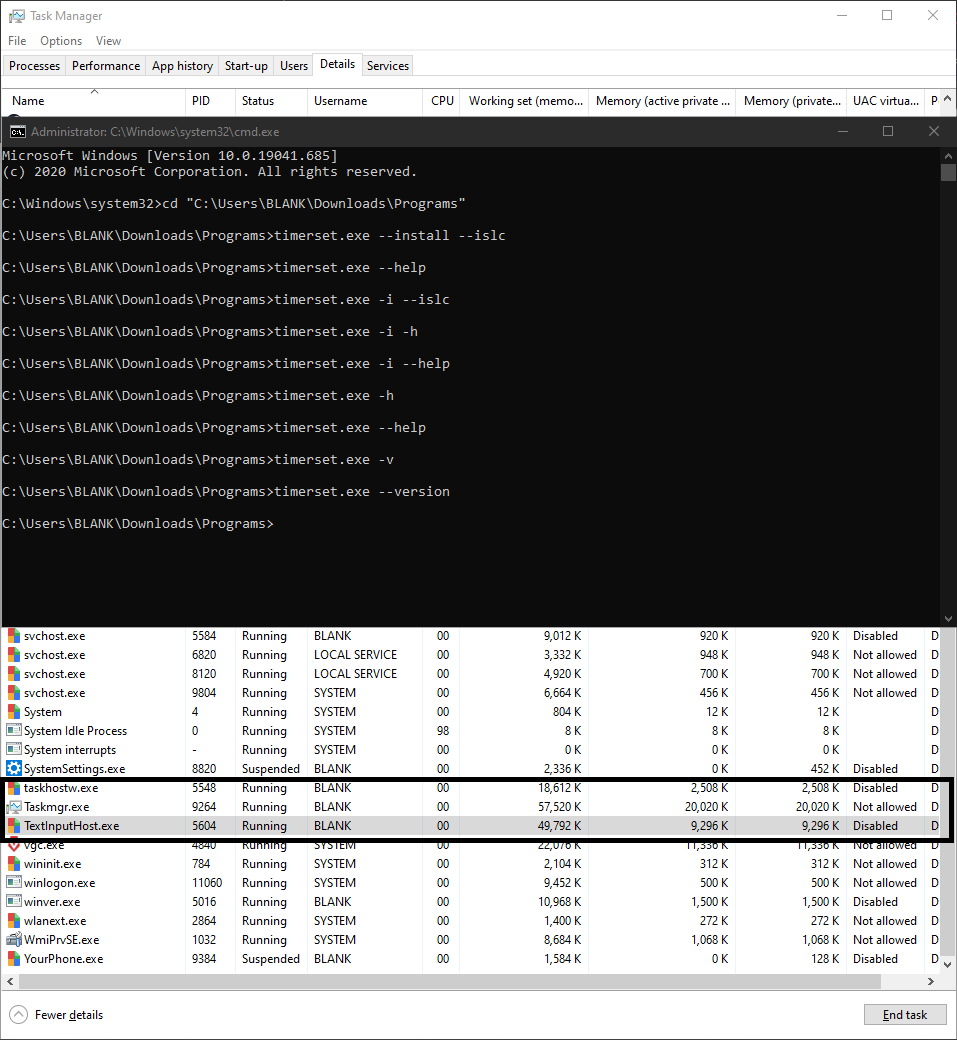
I also tried disabling Windows Defender completely and added it to exclusions.
Am I missing something? Should I be installing something? Am I required to install WDK? Thank you again!
I tried running different flags through an elevated CMD but it doesn't print anything.
Steps to Reproduce:
timerset_windows_v0.3.0.exetotimerset.exetimerset.exeis. `cd "C:\Users\BLANK\Downloads\Programs"timerset.exe --install --islctimerset.exe --help,timerset.exe -h,timerset.exe --values,timerset.exe -v, etc...Expected behaviour:
Should display/prints values and other information. Also,
timerset.exeshould be seen in the Task Manger underdetails.Actual behavior:
Doesn't do anything. It doesn't print any information. If you tried
timerset.exe --install, it doesn't run or being registered in Task Manager processes underdetailstab.Environment
I also tried disabling Windows Defender completely and added it to exclusions.
Am I missing something? Should I be installing something? Am I required to install WDK? Thank you again!